DevTools
The DevTools SDK and CLI are currently in pre-release status. DevTools is designed for development use only and should never be deployed in production environments.
The OpenRouter DevTools provide a comprehensive solution for SDK telemetry capture and visualization during development. Monitor your AI application’s requests, responses, token usage, and errors in real-time with a beautiful web interface.
Why use DevTools?
Building with AI SDKs requires visibility into what’s happening under the hood. The OpenRouter DevTools give you complete insight into your SDK operations without adding complexity or impacting performance.
Two main components:
- SDK Telemetry Hooks - Automatically capture all SDK operations in development
- DevTools Viewer - Beautiful web UI for visualizing captured telemetry data
Key Features
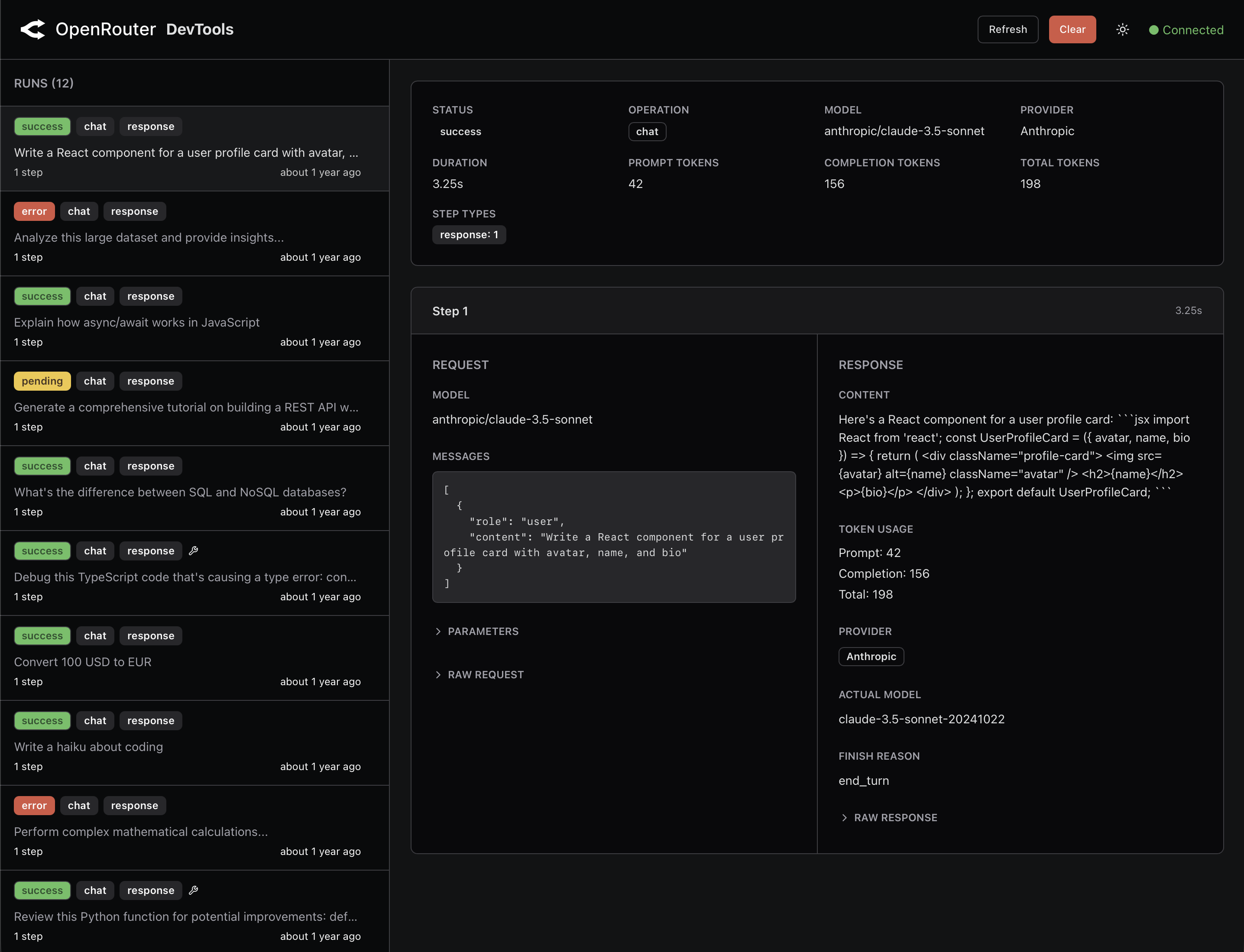
SDK DevTools Viewer
Launch a web-based interface to visualize your SDK telemetry:
- Real-time run tracking - View all SDK operations (chat, embeddings, etc.) as they happen
- Detailed step analysis - Inspect request/response data, timing, and errors for each step
- Token usage insights - Track prompt and completion tokens across all requests
- Error debugging - Easily identify and debug failed requests with full error details
- Multi-run comparison - Compare different SDK runs side-by-side
- Dark/Light mode - Full theme support with automatic system preference detection
SDK Telemetry Hooks
Developer-friendly hooks that automatically capture:
- All chat completions with full request/response data
- Token usage and costs
- Timing information for performance analysis
- Errors and failure modes
- Tool/function calls
- Current directory, git branch, and model information
Installation
Install the DevTools package as a development dependency:
Important: DevTools is designed for development only. It will throw an error if NODE_ENV === 'production' to prevent accidental production deployment.
Quick Start - SDK Hooks
Integrate DevTools hooks into your SDK client to start capturing telemetry:
Basic Usage
Custom Configuration
Quick Start - DevTools Viewer
Launch the DevTools web interface to visualize captured telemetry:
This starts a local server on port 4983 and opens your browser to view:
- All SDK runs with timestamps and status
- Step-by-step request/response details
- Token usage and costs
- Error messages and stack traces
- Performance timing information
The viewer automatically refreshes when new telemetry data is captured.
How It Works
Telemetry Capture Flow
- SDK hooks intercept requests before they’re sent
- Telemetry data is captured asynchronously (non-blocking)
- Data is stored in
.devtools/openrouter-generations.json - A notification is sent to the local DevTools server (if running)
- The DevTools viewer updates in real-time
Non-Intrusive Design
- Zero SDK impact - Telemetry capture is async and never blocks SDK operations
- Graceful degradation - Errors in DevTools never break your SDK calls
- Development-only - Throws error if used in production (
NODE_ENV === 'production')
Storage Location
By default, telemetry is stored in:
This file contains:
- Runs - Top-level tracking of SDK operations
- Steps - Individual request/response pairs within each run
- Metadata - Timestamps, status, token usage, errors
Configuration Options
Hook Configuration
When calling createOpenRouterDevtools(), you can customize:
DevTools Server Configuration
The DevTools viewer runs on port 4983 by default. This can be configured in your OpenRouter CLI configuration at ~/.openrouter/claude-code-proxy.json:
Operations Captured
The DevTools hooks automatically capture these SDK operations:
chat.send()- Chat completions API callschat.createResponses()- Responses API callsembeddings.create()- Embeddings API calls
All other SDK operations are currently ignored.
Data Captured Per Step
For each SDK operation, DevTools captures:
Request Data:
- Model name
- Messages/prompts
- Parameters (temperature, max_tokens, etc.)
Response Data:
- Generated content
- Token usage (prompt + completion tokens)
- Provider and model used
- Finish reason
- Tool calls (if any)
Metadata:
- Start and completion timestamps
- Duration in milliseconds
- Status (success, error, in_progress)
- Error details (if failed)
Safety & Best Practices
Production Environment Protection
DevTools will throw an error if initialized when NODE_ENV === 'production':
Non-Blocking Architecture
- All telemetry capture happens asynchronously
- DevTools errors never propagate to your SDK calls
- Failed writes are logged but don’t break your application
Error Handling
DevTools failures are handled gracefully:
Troubleshooting
Port Already in Use
If port 4983 is already in use:
Solution: Either stop the process using port 4983, or configure a different port in ~/.openrouter/claude-code-proxy.json:
Then update your hook configuration:
Storage Location Issues
If you can’t find the telemetry file:
- Check the default location:
.devtools/openrouter-generations.json - Ensure you have write permissions in your working directory
- Check for custom
storagePathconfiguration
DevTools Viewer Not Updating
If the viewer doesn’t show new requests:
- Verify the DevTools server is running (
openrouter devtools) - Check that
serverUrlmatches the DevTools server port - Ensure the telemetry file is being written (check
.devtools/directory) - Try refreshing the browser manually
Common Setup Issues
Issue: DevTools package not found
Solution: Install the package:
Issue: Accidental production usage
Solution: Only initialize DevTools in development:

