

Claude Code
Claude Code with OpenRouter is only guaranteed to work with the Anthropic first-party provider. For maximum compatibility, we recommend setting Anthropic 1P as top priority provider when using Claude Code.
Why Use OpenRouter with Claude Code?
OpenRouter adds a reliability and management layer between Claude Code and Anthropic’s API, giving you and your organization several key benefits.
Provider Failover for High Availability
Anthropic’s API occasionally experiences outages or rate limiting. When you route Claude Code through OpenRouter, your requests automatically fail over between multiple Anthropic providers. If one provider is unavailable or rate-limited, OpenRouter seamlessly routes to another, keeping your coding sessions uninterrupted.
Organizational Budget Controls
For teams and organizations, OpenRouter provides centralized budget management. You can set spending limits, allocate credits across team members, and prevent unexpected cost overruns. This is especially valuable when multiple developers are using Claude Code across your organization.
Usage Visibility and Analytics
OpenRouter gives you complete visibility into how Claude Code is being used across your team. Track usage patterns, monitor costs in real-time, and understand which projects or team members are consuming the most resources. All of this data is available in your OpenRouter Activity Dashboard.
Quick Start
This guide will get you running Claude Code powered by OpenRouter in just a few minutes.
Step 1: Install Claude Code
Native Install (Recommended)
npm
macOS, Linux, WSL:
Windows PowerShell:
Step 2: Connect Claude to OpenRouter
Instead of logging in with Anthropic directly, connect Claude Code to OpenRouter. This requires setting a few environment variables.
Requirements:
- Use
https://openrouter.ai/apifor the base url - Provide your OpenRouter API key as the auth token
- Important: Explicitly blank out the Anthropic API key to prevent conflicts
Shell Profile
Project Settings File
Add these environment variables to your shell profile:
Persistence: We recommend adding these lines to your shell profile (~/.bashrc, ~/.zshrc, or ~/.config/fish/config.fish).
Variable Location: Do not put these in a project-level .env file. The native Claude Code installer does not read standard .env files.
Step 3: Clear any cached Anthropic login
If you were previously logged in to Claude Code with an Anthropic account, you must run /logout once to remove the cached session. Claude Code warns about auth conflicts when both a cached login and ANTHROPIC_AUTH_TOKEN are present, and the conflict can cause unexpected behaviour on startup — typically surfacing as confusing model-not-found errors (e.g. for openrouter/auto, openrouter/pareto-code, or any other OpenRouter-only model).
Then quit and re-launch claude so it picks up the new environment variables.
If you have never logged in to Claude Code with Anthropic, you can skip this step.
Step 4: Start your session
Navigate to your project directory and start Claude Code:
You are now connected! Any prompt you send will be routed through OpenRouter.
Step 5: Verify
You can confirm your connection by running the /status command inside Claude Code.
You can also check the OpenRouter Activity Dashboard to see your requests appearing in real-time.
How It Works
OpenRouter exposes an input that is compatible with the Anthropic Messages API.
- Direct Connection: When you set
ANTHROPIC_BASE_URLtohttps://openrouter.ai/api, Claude Code speaks its native protocol directly to OpenRouter. No local proxy server is required. - Anthropic Skin: OpenRouter’s “Anthropic Skin” behaves exactly like the Anthropic API. It handles model mapping and passes through advanced features like “Thinking” blocks and native tool use.
- Billing: You are billed using your OpenRouter credits. Usage (including reasoning tokens) appears in your OpenRouter dashboard.
Configuring Models
Claude Code uses several environment variables to determine which models to use for different tasks. You can override these to route each role through a specific model:
Add these to the same shell profile or project settings file where you set ANTHROPIC_BASE_URL and ANTHROPIC_AUTH_TOKEN.
Claude Code is optimized for Anthropic models and may not work correctly with other providers.
Fast Mode
Anthropic’s fast mode provides up to 2.5x faster output at premium pricing. Fast mode is only available on Claude Opus 4.6, Claude Opus 4.7, and Claude Opus 4.8 — no other Anthropic models support it.
For each supported Opus version, there are two equivalent ways to request fast mode on OpenRouter:
- Send
speed: "fast"withanthropic/claude-opus-4.8,anthropic/claude-opus-4.7, oranthropic/claude-opus-4.6— OpenRouter reroutes the request to the matching*-fastmodel (for example,anthropic/claude-opus-4.6→anthropic/claude-opus-4.6-fast). - Call the
*-fastmodel directly —anthropic/claude-opus-4.8-fast,anthropic/claude-opus-4.7-fast, oranthropic/claude-opus-4.6-fast.
Both options route through the Anthropic first-party provider, and the required beta header is injected automatically.
Using /fast in Claude Code
Claude Code has a built-in /fast command that toggles fast mode. When enabled, Claude Code sends speed: "fast" in its requests alongside the configured Opus model. OpenRouter fully supports this parameter — you just need to set the following environment variable:
Requires Claude Code v2.1.96 or newer.
Pricing
Fast mode is priced at a premium over the underlying Claude Opus model’s standard token rates. See Anthropic’s fast mode pricing for current rates. When fast mode is active, the response’s usage object includes "speed": "fast" to confirm the request was processed at the higher speed tier.
If speed: "fast" is sent for a model that does not support fast mode, OpenRouter silently drops the parameter and the request proceeds at standard speed with standard pricing.
Routing behavior
Fast mode is only served by the Anthropic first-party provider, since other providers (e.g. Amazon Bedrock, Google Vertex) do not support it.
Agent SDK
The Anthropic Agent SDK lets you build AI agents programmatically using Python or TypeScript. Since the Agent SDK uses Claude Code as its runtime, you can connect it to OpenRouter using the same environment variables described above.
For complete setup instructions and code examples, see our Anthropic Agent SDK integration guide.
GitHub Action
You can use OpenRouter with the official Claude Code GitHub Action.To adapt the example workflow for OpenRouter, make two changes to the action step:
- Pass your OpenRouter API key via
anthropic_api_key(store it as a GitHub secret namedOPENROUTER_API_KEY) - Set the
ANTHROPIC_BASE_URLenvironment variable tohttps://openrouter.ai/api
Cost Tracking Statusline
You can add a custom statusline to Claude Code that tracks your OpenRouter API costs in real-time. The statusline displays the provider, model, cumulative cost, and cache discounts for your session.
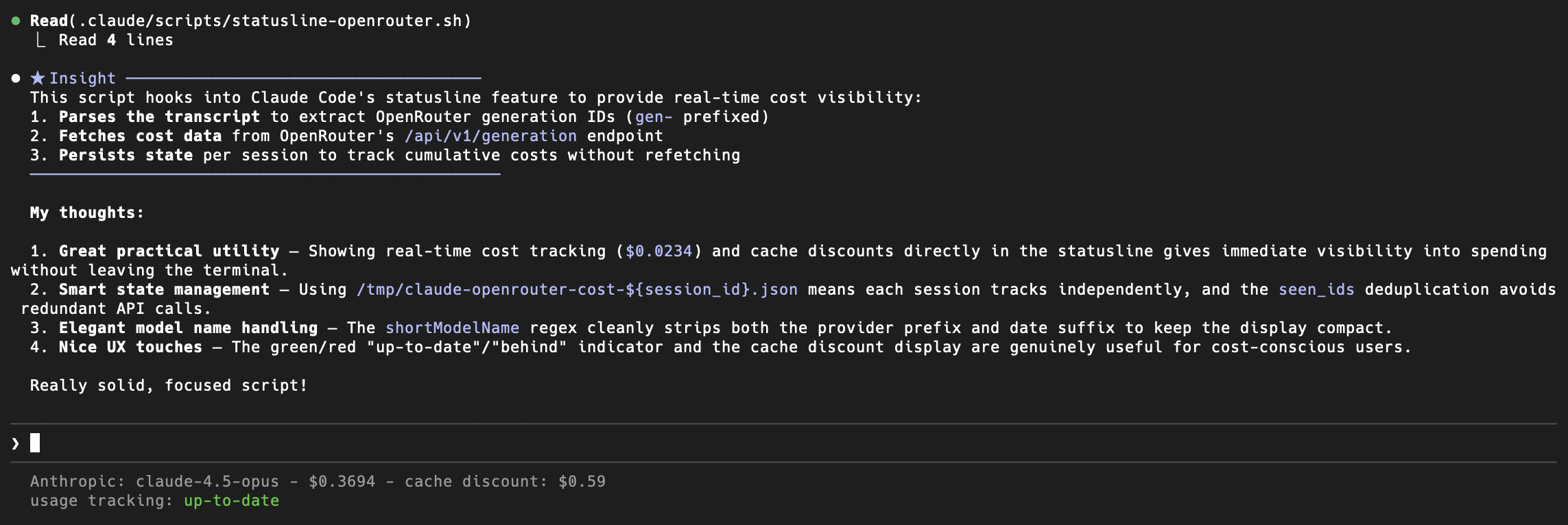
Download the statusline scripts from the openrouter-examples repository, make them executable, and add the following to your ~/.claude/settings.json:
The script uses your ANTHROPIC_AUTH_TOKEN environment variable, which should already be set to your OpenRouter API key if you followed the setup above.
Troubleshooting
- Model-not-found errors for OpenRouter models (e.g.
openrouter/auto,openrouter/pareto-code): Usually caused by a credential conflict that surfaces as auth-conflict warnings on startup. There are two distinct scenarios. (1) If you have a cached Anthropic OAuth login from before switching to OpenRouter, run/logoutinside Claude Code, then quit and re-launchclaudeto clear the cached session. (2) If your shell profile still has a realANTHROPIC_API_KEYset (e.g. an old Anthropic console key),/logoutwill not help — it only clears the cached OAuth session, not shell environment variables. Instead, ensureANTHROPIC_API_KEY=""is set in your shell profile per Step 2, then restart your terminal. Verify with/statusthat the auth token isANTHROPIC_AUTH_TOKENand the base URL ishttps://openrouter.ai/api. - Auth Errors: Ensure
ANTHROPIC_API_KEYis set to an empty string (""). If it is unset (null), Claude Code might fall back to its default behavior and try to authenticate with Anthropic servers. If you still see auth errors after setting it, run/logout(see above). - Context Length Errors: If you hit context limits, consider breaking your task into smaller chunks or starting a new session.
- Privacy: OpenRouter does not log your source code prompts unless you explicitly opt-in to prompt logging in your account settings. See our Privacy Policy for details.