Choosing the Optimal Image Input Detail Level in LLMs
Abhinav Pola ·

If you set detail: low on your image inputs to cut costs, you may not be getting the improvements you expect. In July 2026, we benchmarked the image detail parameters on five OpenAI and Google models and found some surprising relationships between detail levels, reasoning, and costs.
For example, when we benchmarked gpt-5.5’s low versus auto image detail on MMMU-Pro Vision, low detail scored 13.8 points worse (65.2% vs 79.0%) and cost more per question (5.1¢ vs 4.5¢). The model compensated for the downsampled images by thinking 1.6x harder. The cost of these reasoning tokens outweighed the image tokens saved on input.
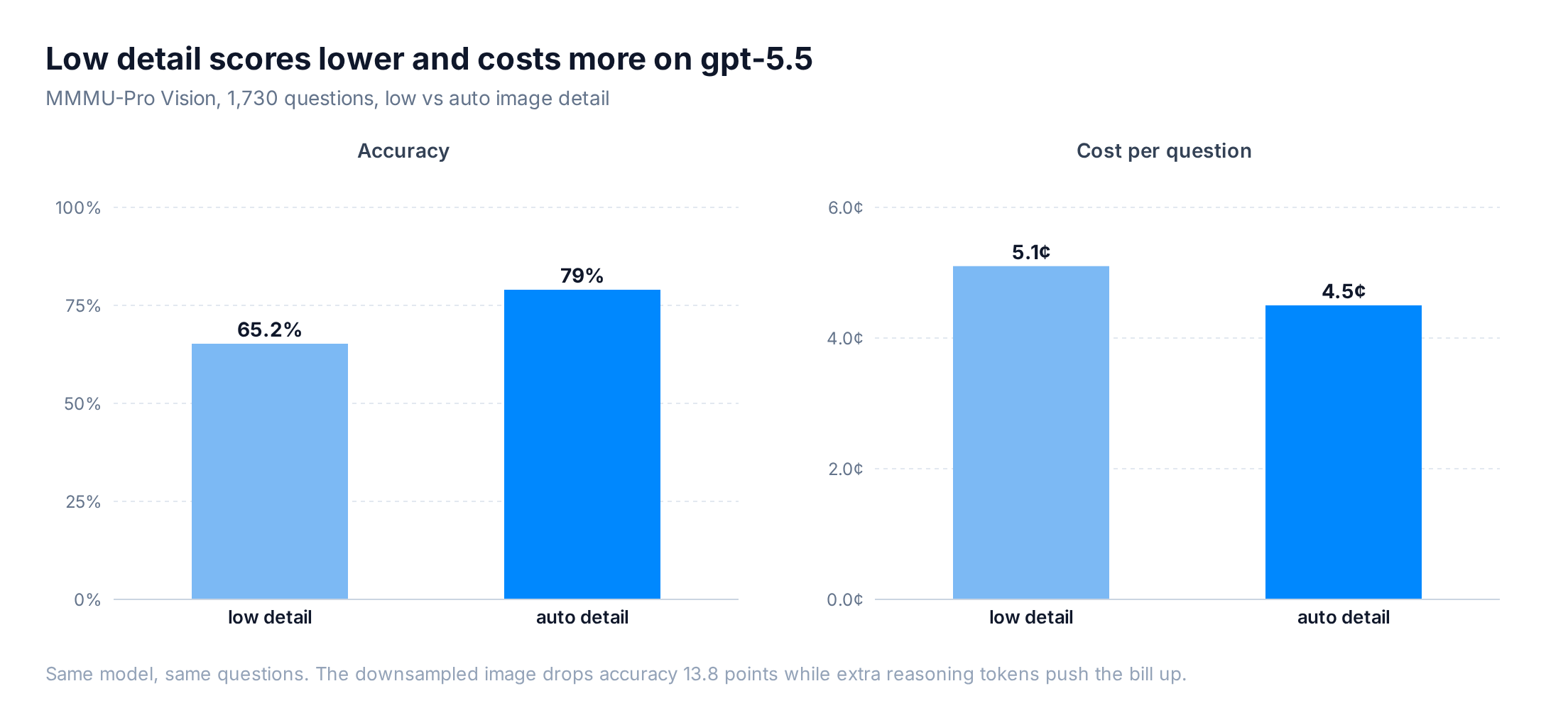
We found a more effective path for saving costs on image processing in reasoning models: send a clearer image (auto or high), and adjust reasoning effort instead.
Auto detail produces better results on every model, and sometimes costs less
We ran five models from OpenAI and Google at both low and auto, temperature 0, one epoch. Every model scored higher on auto.
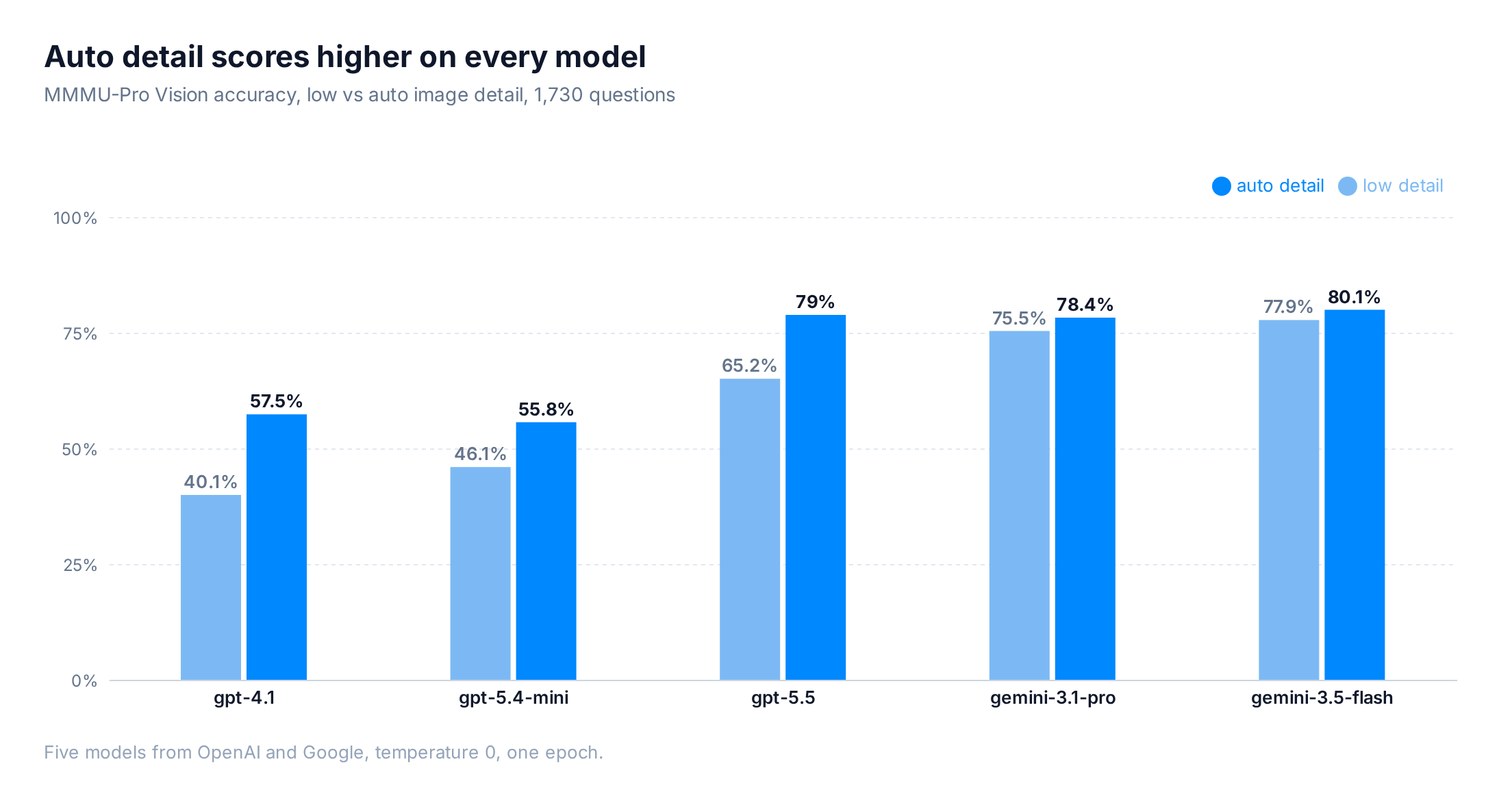
| Model | Detail | Accuracy | Cost / question | Reasoning tok/req |
|---|---|---|---|---|
| gpt-5.5 | low | 65.2% | 5.1¢ | 1,180 |
| gpt-5.5 | auto | 79.0% | 4.5¢ | 730 |
| gpt-5.4-mini | low | 46.1% | 0.08¢ | 0 |
| gpt-5.4-mini | auto | 55.8% | 0.14¢ | 0 |
| gpt-4.1 | low | 40.1% | 0.43¢ | 0 |
| gpt-4.1 | auto | 57.5% | 0.66¢ | 0 |
| gemini-3.5-flash | low | 77.9% | 2.96¢ | 2,876 |
| gemini-3.5-flash | auto | 80.1% | 2.80¢ | 2,602 |
| gemini-3.1-pro | low | 75.5% | 9.53¢ | 6,344 |
| gemini-3.1-pro | auto | 78.4% | 11.12¢ | 6,964 |
Low detail makes gpt-5.5 think harder
Per OpenAI’s vision docs, detail: low gives the model a low-resolution 512x512 version of the image, regardless of the original size, and bills it at a small fixed token cost. While this saves on input tokens, it also means that useful fine details may not survive the downscale.
On gpt-5.5, low detail produced 1,180 reasoning tokens per request versus 730 on auto, a 1.6x jump, plus 39% more completion tokens (489 vs 351). The model spent that extra effort squinting at small text and diagrams it could no longer read cleanly.
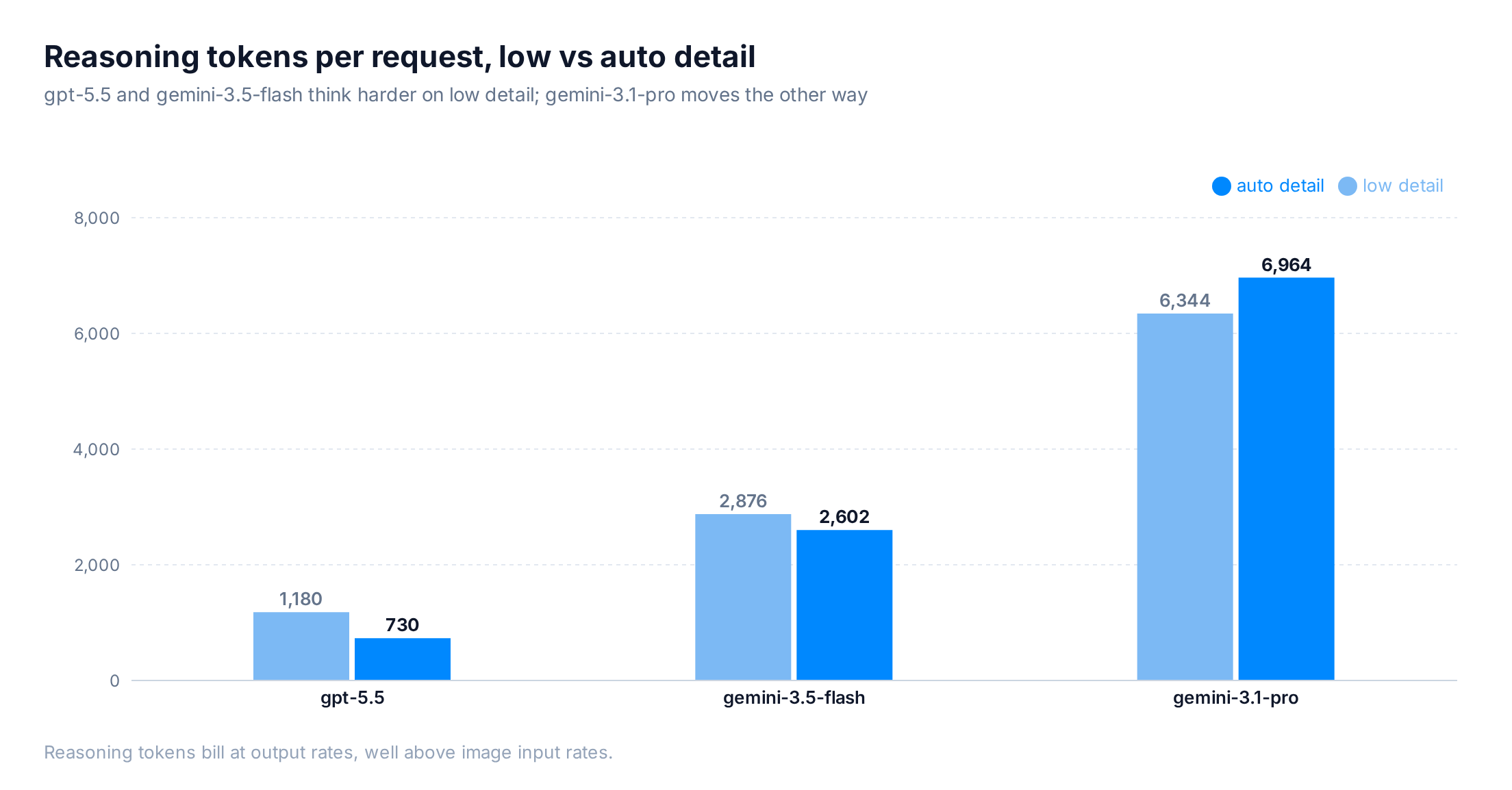
Output tokens bill higher than image tokens, so the cheaper input cost was offset. The same model asking same questions at low detail cost 0.6¢ per question more than auto. You paid more and scored worse.
One caution before generalizing: the token pattern varies by model. gemini-3.5-flash also used more reasoning tokens on low (2,876 vs 2,602), but gemini-3.1-pro used slightly fewer (6,344 vs 6,964), and its low run came out cheaper.
gpt-5.4-mini and gpt-4.1 don’t reason, so they sat at 0 thinking tokens on both settings. With no output side to grow, the input savings survive (more on that below).
What accuracy gains can you get from clearer images?
Switching from low to auto bought between 2 and 17 points of accuracy, depending on the model.
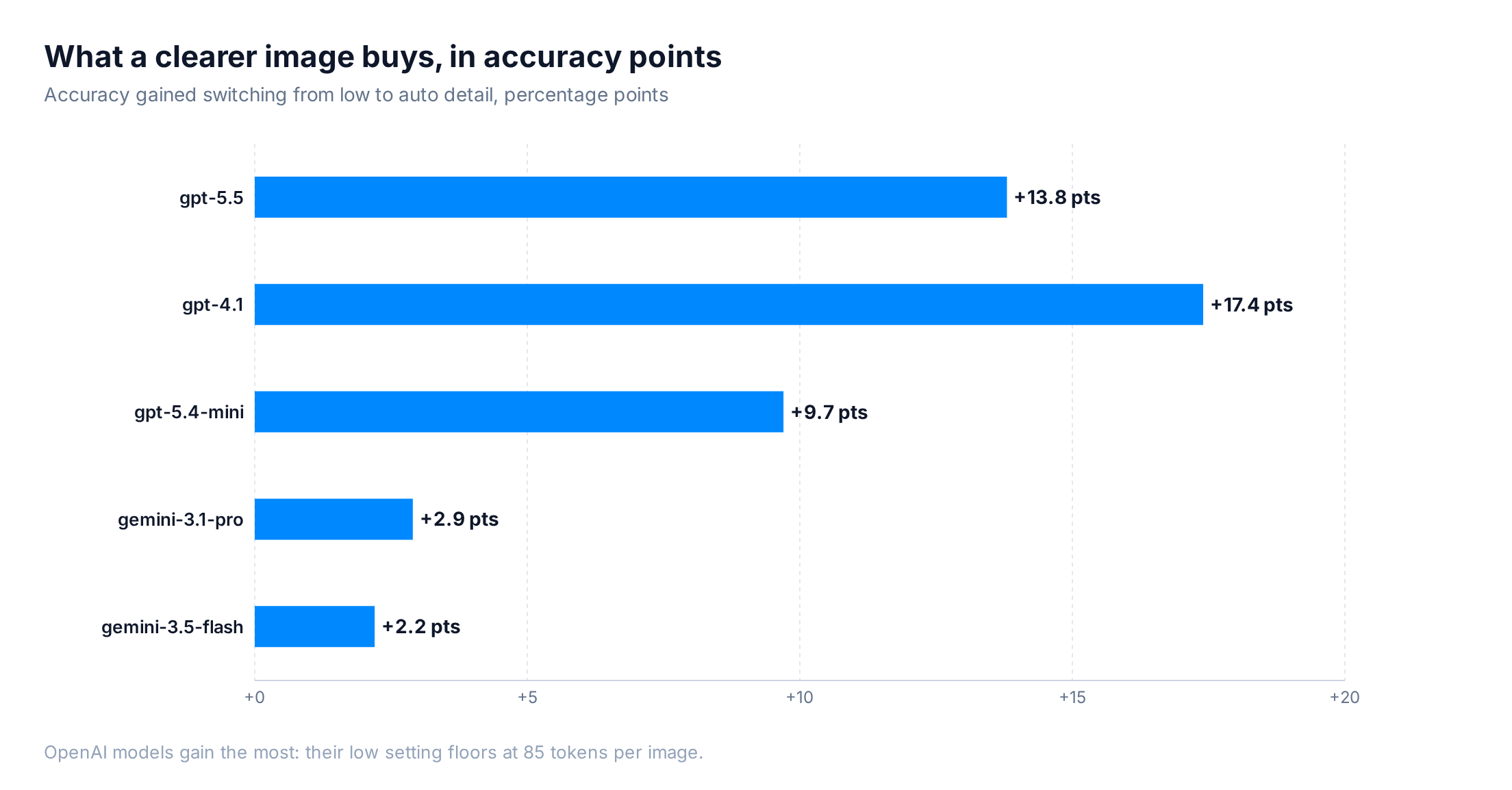
The OpenAI models gain the most because their low setting downscales every image to 512x512 with a small fixed token cost (85 tokens on gpt-4.1). Gemini’s low resolution keeps roughly 273 tokens per part, so it starts from a sharper baseline and has less to lose.
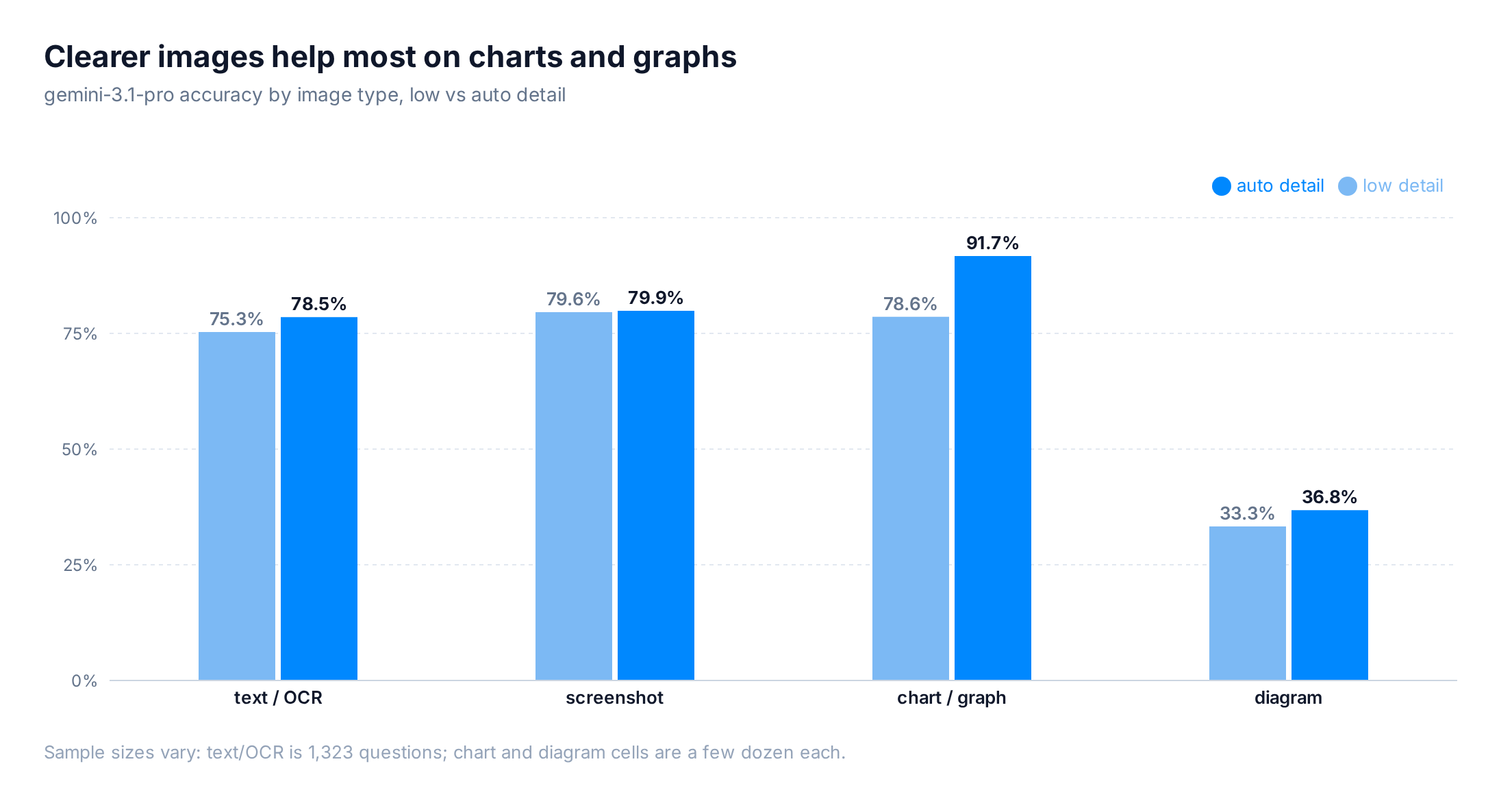
The gains concentrate by image type. The dataset is 76% text and OCR, plus another 19% screenshots, so most questions already sit near the model’s ceiling and barely move with detail. The clearest jump lands on charts and graphs: gemini-3.1-pro climbed from 78.6% to 91.7% on those with auto detail. Diagrams stay the hardest category either way, around a third correct (on a small sample of 21 questions).
Here’s one of those questions, a 2239×1279 mechanical engineering figure that asks you to pick the correct main view from four near-identical orthographic projections:
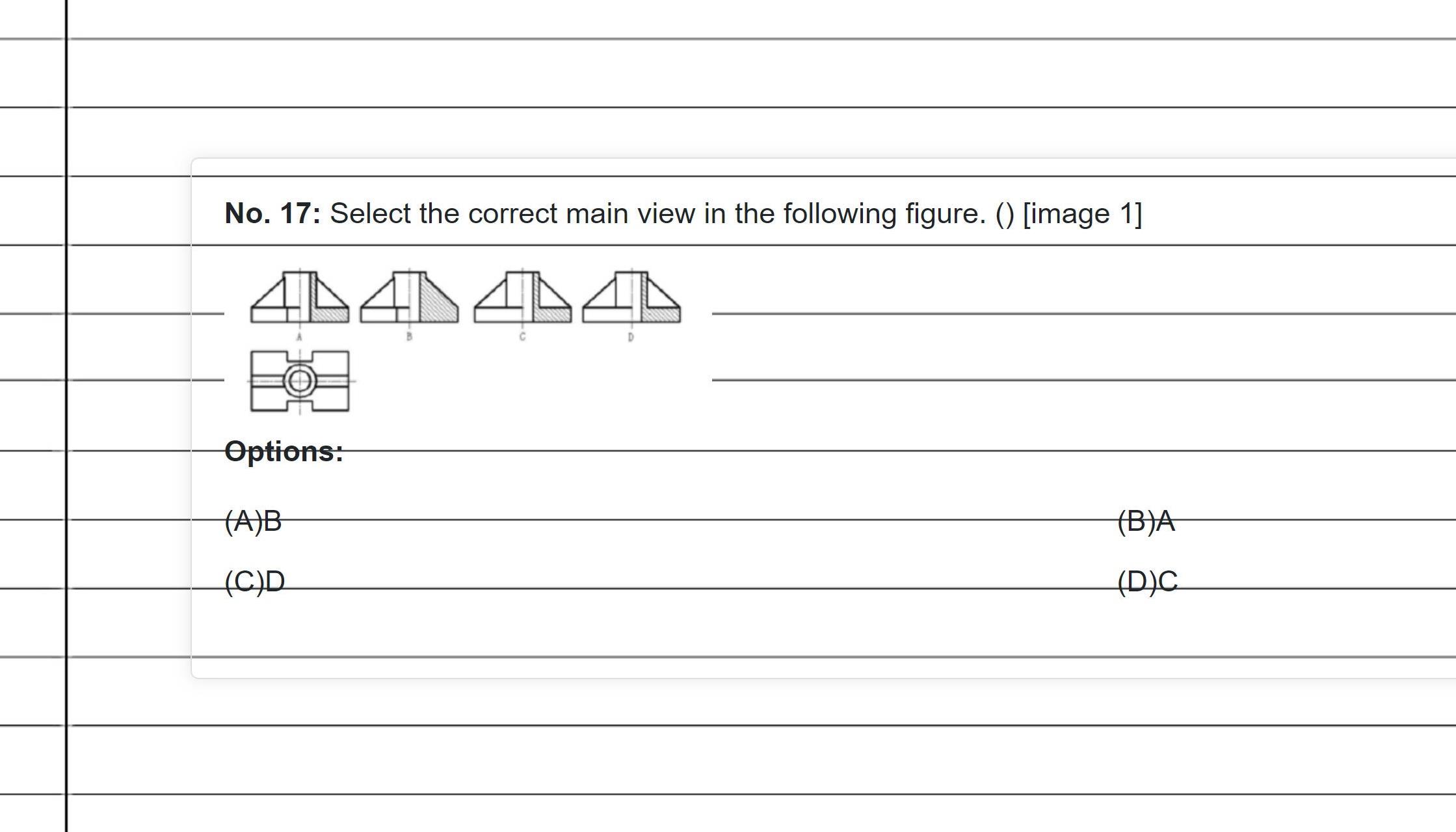
The four candidate views differ only in where the hatching and hidden lines sit. At auto detail, gpt-5.5 picks B, the right answer. At low, the same figure collapses to a 512px thumbnail, those thin lines blur together, and the model lands on C after a longer chain of thought. Longer reasoning is a poor substitute for a legible image.
Reasoning level has the most significant effect on cost
Detail level and reasoning effort look like they do similar jobs, but in our runs they landed in very different places. Changing detail swung accuracy by 2 to 17 points while barely touching the bill. Changing reasoning effort swung the bill by 50 to 75 percent while accuracy wandered 1 to 2 points, within noise.
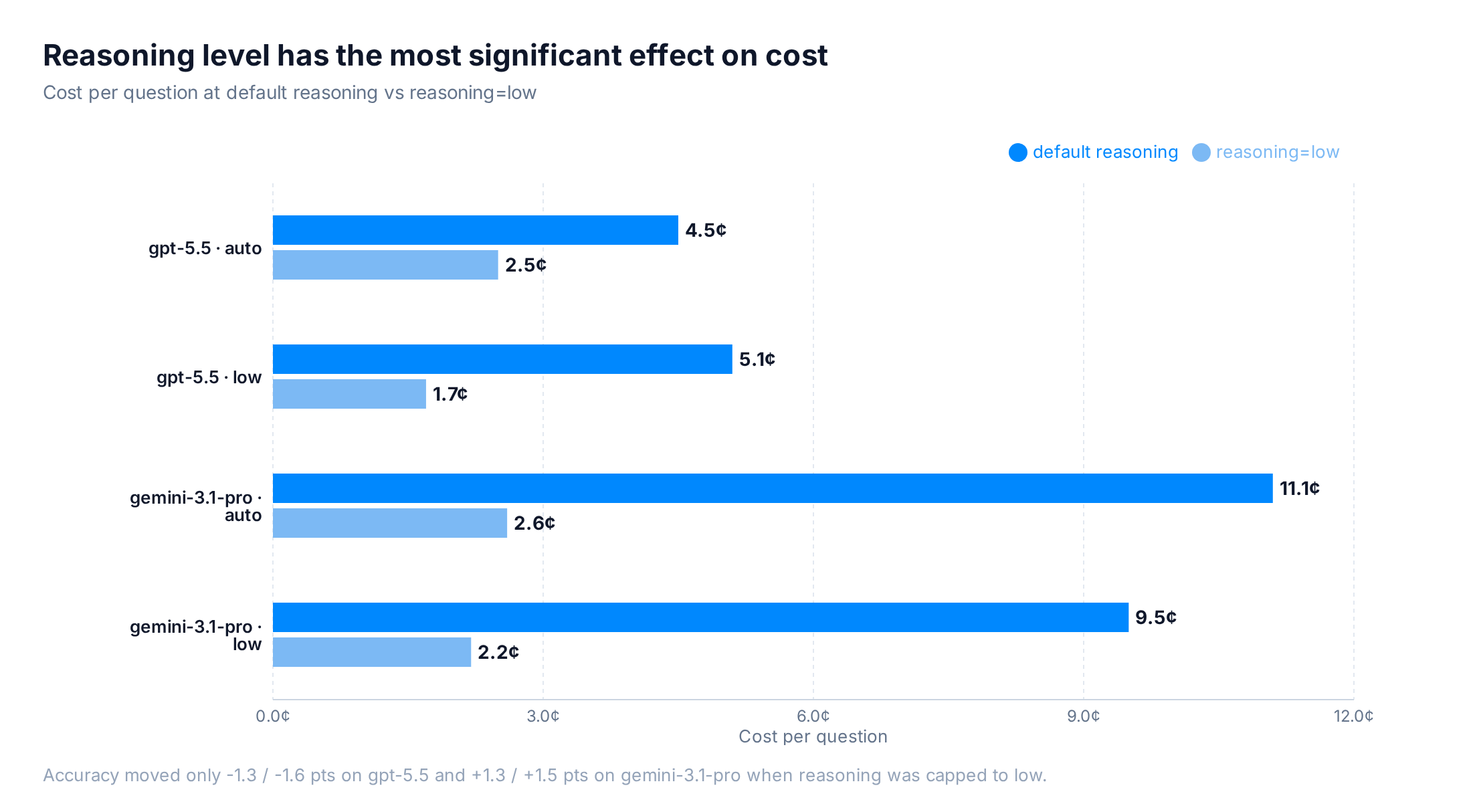
Capping gpt-5.5 to reasoning=low took the low-detail cost from 5.1¢ down to 1.7¢ per question, a 67% cut, while accuracy moved 1.3 points (65.2% to 63.9%). On gemini-3.1-pro the auto run dropped from 11.1¢ to 2.7¢ and accuracy rose 1.5 points. So if you want a cheaper image pipeline, cap reasoning effort and keep the image sharp.
Low detail still pays off on non-reasoning models
On a non-reasoning model, low detail does what you’d expect. gpt-5.4-mini ran 0.08¢ per question on low versus 0.14¢ on auto, about 40% cheaper, because there’s no reasoning loop to inflate the bill. The trade is accuracy, which fell from 55.8% to 46.1%.
Latency moves the same way. gpt-4.1 averaged 960ms per request on low against 1,148ms on auto, and gpt-5.4-mini ran 1,348ms against 1,776ms. Low detail caps the image at a small fixed prompt-token cost (85 tokens on gpt-4.1), so there’s far less to read in before the model starts writing. With no reasoning loop to drag out the tail, that shorter prefill shows up as a faster response.
Picking the right detail level for your workload
The choice comes down to whether your model reasons:
- Reasoning models (gpt-5.5 and similar): keep
autoorhigh, and use reasoning effort to control cost. In our runs, low detail scored worse on every reasoning model and cost more on two of the three. - Non-reasoning models (gpt-5.4-mini and similar): low detail cuts cost and shaves latency, yet has reduced accuracy on text-heavy images.
Either way, the detail setting has a much smaller impact on final cost when compared to more expensive output tokens. In most cases, you’re better off leaving image detail on auto and adjusting reasoning.
OpenRouter’s image input API is unified across models, and model-specific parameters like detail level pass through via provider options, so you can tune these settings without changing your integration.
How we tested
- Benchmark: MMMU-Pro Vision (
MMMU/MMMU_Pro, vision config, test split), 1,730 ten-option visual reasoning questions. - Models: gpt-5.5, gpt-5.4-mini, gpt-4.1, gemini-3.5-flash, gemini-3.1-pro, each at
lowandautodetail, temperature 0, one epoch. - Detail: OpenAI
image_url.detaillow/auto; Gemini per-partmediaResolution. No max-token cap. - Image types: classified by gpt-5.4-mini vision (text/OCR, screenshot, diagram, chart, illustration, photo). Per-type accuracy was computed for the Gemini models; OpenAI per-type cells were not scored in this run.
- Metrics: accuracy from eval logs; tokens and latency from OpenRouter generation records.
- Cost: reported as cost per question, the total run cost divided by the number of questions scored in that run. Normalizing this way keeps the comparison fair across runs of slightly different size.
Frequently asked questions
Does setting image detail to "low" save money?
Less than you'd hope, and sometimes nothing. On gpt-5.5, low detail cost more per question (5.1¢ vs 4.5¢): the model compensated with 1.6x more reasoning tokens, billed at output rates, and accuracy fell 13.8 points. On non-reasoning models like gpt-5.4-mini, low detail did cut cost (about 40%) but accuracy dropped roughly 10 points.
Why did low detail cost more on gpt-5.5?
gpt-5.5 worked harder to read the 512-pixel thumbnail, producing 1,180 reasoning tokens per request versus 730 on auto. Those tokens bill at output rates, higher than image input rates, so the output bill outgrew the input savings. This didn't hold everywhere: gemini-3.1-pro used slightly fewer reasoning tokens on low, so its low run was cheaper.
What actually controls the cost of an image request?
Reasoning effort. Capping gpt-5.5 to reasoning=low cut its cost per question from 5.1¢ to 1.7¢ while accuracy moved 1.3 points. Image detail mostly controls accuracy (up to ~17 points), reasoning effort controls most of the cost.
When should I still use low detail?
On a non-reasoning model with simple images, or when a small accuracy drop is an acceptable trade for lower input cost. For text-heavy or diagram-heavy images, send full detail.
Does this happen on non-OpenAI models too?
The direction is the same on Google's Gemini, though smaller: a clearer image lifted accuracy about 2 to 3 points overall, and more on charts and graphs (78.6% to 91.7% on gemini-3.1-pro). Capping reasoning effort barely moved accuracy there either.