How OpenRouter Model Routing Works
OpenRouter · · Updated

If Anthropic rate-limits you mid-traffic, your app shouldn’t return a 500. That single failure mode is a big reason teams reach for an LLM router in the first place. OpenRouter routes every request across 70+ providers, and you control how, down to the provider order, the price ceiling, and the fallback chain.
Routing in OpenRouter is 2 independent decisions: which model answers the request and which provider serves that model. Every configuration option in this guide maps to one of those 2 decisions. Keeping them separate is what lets you configure the right layer when something breaks.
The OpenRouter Python SDK (pip install openrouter) gets you there in a few lines, and switching models is a one-string change. (Already on the OpenAI SDK? Point its base URL at https://openrouter.ai/api/v1 and it works too.)
from openrouter import OpenRouter

client = OpenRouter(api_key="<OPENROUTER_API_KEY>")

resp = client.chat.send(
    model="anthropic/claude-sonnet-4.6",  # change this string to switch models
    messages=[{"role": "user", "content": "Summarize this changelog."}],
)
That’s the whole integration. The routing happens behind that one endpoint, and the rest of this guide works through the routing layers it exposes, with the exact config you copy in.
What an LLM Router Actually Does
Those 2 decisions sit inside a bigger job. A router takes one request to one endpoint and handles the handoff to whatever model and provider should answer it. Every router does 4 of these jobs, and OpenRouter handles all 4:
| Job | What it decides | Where OpenRouter does it |
|---|---|---|
| Model selection | Which model answers the prompt | model field, or openrouter/auto |
| Provider selection | Which provider serves that model | provider object (default: price-based) |
| Load balancing | How to distribute across stable providers | Inverse-square price weighting |
| Failover | What to try when something errors | models array + provider fallback |
Open-source projects like RouteLLM and LLMRouter are routing libraries you self-host and wire into your own infrastructure. OpenRouter is a router you call: a managed service with a single endpoint in front of 400+ models.
The distinction matters when you’re deciding whether to own the routing logic or hand it off, and we come back to it in the router-vs-gateway section.
The Two Layers of Routing in OpenRouter
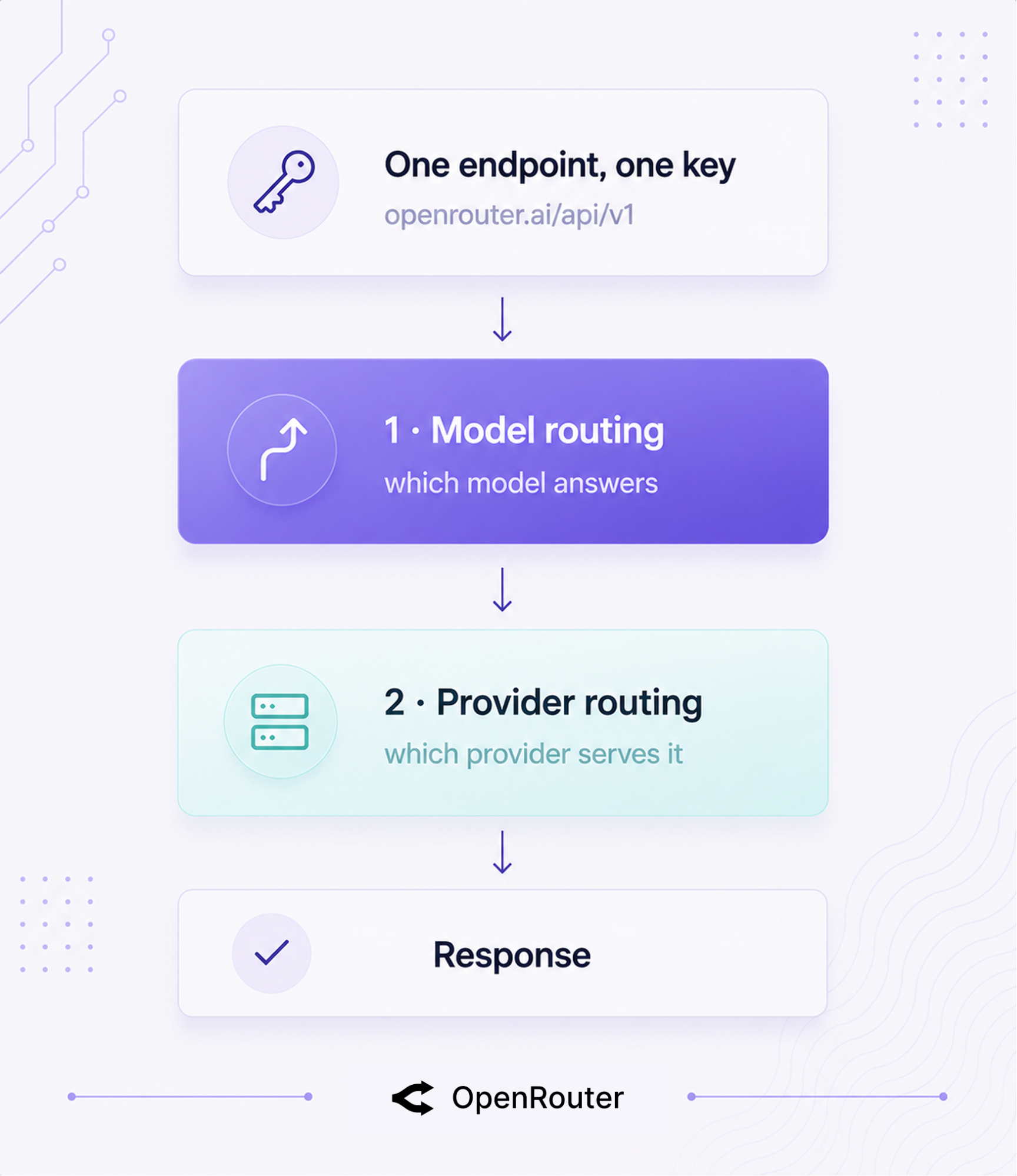
OpenRouter routes on 2 independent layers: model routing (which model answers) and provider routing (which provider serves that model). Hold those 2 apart, and every config below clicks into place.
One OpenAI-compatible endpoint sits in front of both layers: https://openrouter.ai/api/v1, one API key, 400+ models across 70+ providers. You call OpenRouter the same way you’d call OpenAI, and it fans out behind the scenes.
Where each routing decision happens
The minimal request shows both decisions in one payload.
curl https://openrouter.ai/api/v1/chat/completions \
  -H "Authorization: Bearer $OPENROUTER_API_KEY" \
  -H "Content-Type: application/json" \
  -d '{
    "model": "anthropic/claude-sonnet-4.6",
    "messages": [{"role": "user", "content": "Hello"}]
  }'
The model field is your model routing decision. If a given model is served by several providers, OpenRouter’s provider routing picks which one handles this specific call. You explicitly set the model; provider selection runs automatically unless you override it.
One key, many providers
The single-key setup means you use one OpenRouter API key to access multiple providers. If you want to use your own provider keys instead, the BYOK guide covers that path. It keeps your existing provider agreements while adding failover and routing on top.
Which Routing Mode Fits Which Job
Before the mechanics, here’s the map. The sections after this one show how each mode works. Use overrides for the constraints the default can’t see: compliance, latency budgets, cost caps, and cross-model resilience.
| Your situation | Use | Why |
|---|---|---|
| Cheapest reliable, don’t care which provider | Default load balancing | Inverse-square weighting handles it |
| Must hit one provider (compliance, BYOK, region) | provider.order + allow_fallbacks: false | Hard stop, no silent fallback |
| Latency-sensitive (user-facing chat) | :nitro | Routes for throughput |
| Cost-capped batch jobs | :floor / max_price | Routes for price, enforces a ceiling |
| Need cross-model resilience | models fallback array | Survives a whole model going down |
| Don’t know what prompts users send | openrouter/auto | Market spend share picks per prompt |
The rest of this guide works through these modes in order, starting with the one that runs when you set nothing.
How Provider Routing Works
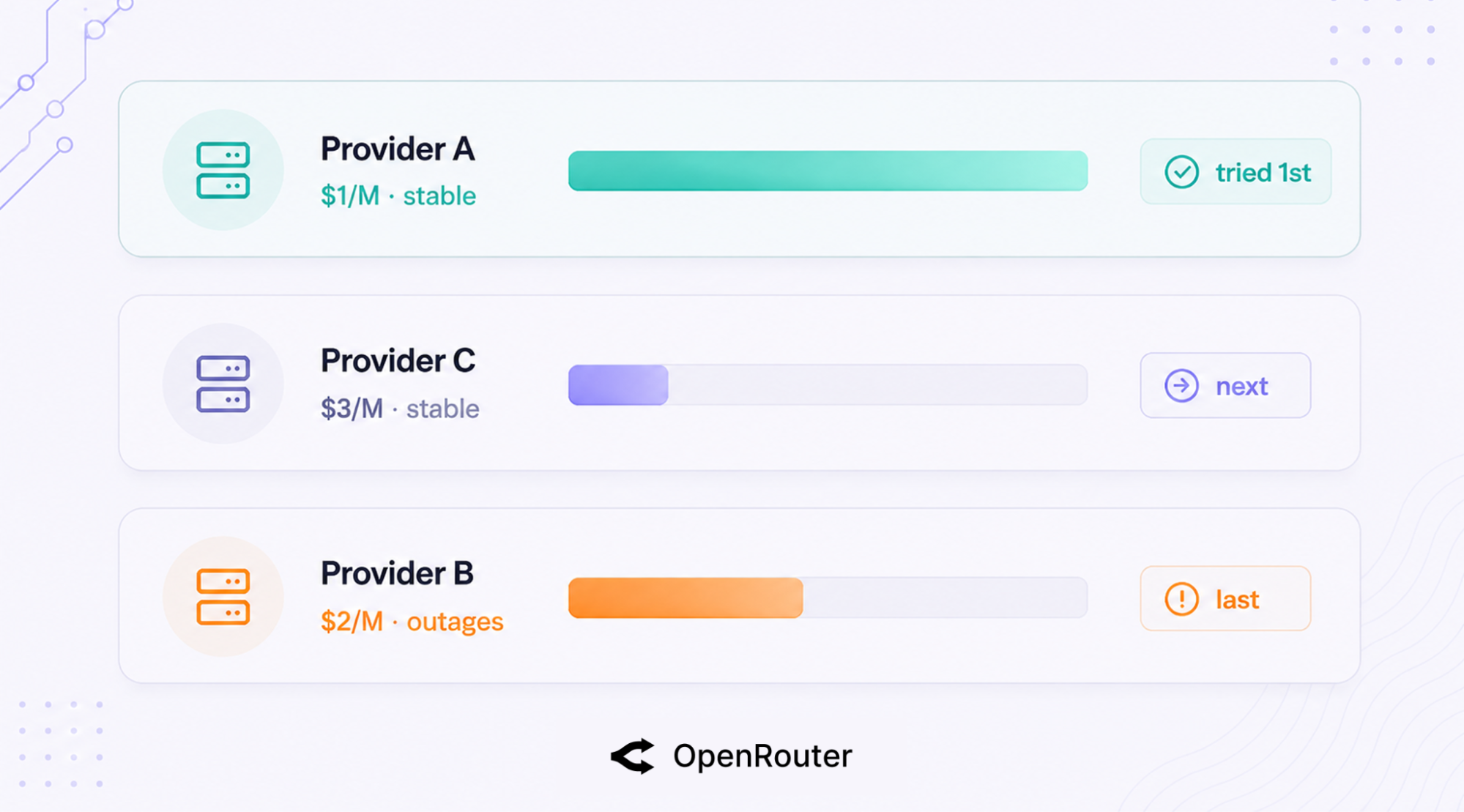
By default, OpenRouter sends your request to the cheapest reliable provider, weighted by the inverse square of price. This is the layer that makes routing decisions and runs on every request unless you override it.
The default strategy, step by step
When a model has multiple providers and you haven’t set sort or order, OpenRouter runs 3 steps, per the provider-routing docs:
- Prioritize providers with no significant outages in the last 30 seconds (unstable ones drop to the back of the line, they aren’t removed).
- Among the stable providers, pick from the lowest-cost candidates, weighted by the inverse square of price.
- Use the remaining providers as fallbacks.
Setting sort or order, or a default sort in your account settings, turns load balancing off and routes by your rule instead. Leave them unset and you get the price-weighted default.
The worked example (why inverse-square matters)
Here’s the docs’ worked example of how that default plays out. Say a model is served by 3 providers: Provider A at $1/M tokens, Provider B at $2/M, and Provider C at $3/M, and Provider B recently had outages.
Inverse-square weighting means A is roughly 9x more likely than C to be tried first (1/3² gives C 1/9 the weight of A). If A fails, C is next. B, fresh off outages, gets tried last.
The squaring pulls traffic hard toward the cheapest stable option instead of spreading it evenly, so you’re not paying $3/M when a healthy $1/M provider is sitting right there.
OpenRouter runs this strategy in production across 70+ providers at 100 trillion tokens a month, which is the operating reality the example is drawn from. The 2 rules to remember: the 30-second outage window and the inverse-square price weighting.
One caveat on that default: it governs standard requests. Requests that include tools route through Auto Exacto, OpenRouter’s quality-first routing step for tool calls, which tiers providers by tool-call quality signals (pushing the lowest performers to the back) and runs by default. Any explicit provider.sort or order skips it, so to route a tool-calling request by price, use :floor or provider.sort: "price".
Controlling Routing with the provider Object
Add a provider object to the request body and you override the default entirely. The full object is documented here; these are the fields developers reach for first.
| Field | What it does | Default |
|---|---|---|
order | Try providers in this exact order | unset |
allow_fallbacks | Fall through to other providers if your picks fail | true |
sort | Route by "price", "throughput", or "latency" | unset |
only | Restrict to this allowlist of providers | unset |
ignore | Exclude these providers | unset |
quantizations | Restrict to specific quantization levels | unset |
data_collection | "allow" or "deny" providers that train on data | unset |
zdr | Require Zero Data Retention (ZDR) providers | unset |
max_price | Cap the per-token price you’ll accept | unset |
preferred_min_throughput | Prefer providers above this throughput | unset |
preferred_max_latency | Prefer providers under this latency | unset |
require_parameters | Only use providers supporting your request params | unset |
How do I force a specific provider?
When you must hit one specific provider (a compliance requirement, a BYOK contract, a region constraint) and nothing else, set the order and turn fallbacks off.
{
  "model": "openai/gpt-5.5",
  "provider": { "order": ["openai", "azure"], "allow_fallbacks": false }
}
OpenRouter tries OpenAI, then Azure, and stops. It never falls back to a third provider you didn’t approve.
Exclude a provider with lower-quality variants
Provider quality varies, and OpenRouter says so plainly. Some providers serve more heavily quantized variants of a model that underperform the same model hosted elsewhere. There’s no quality score you can sort or filter by, but you can exclude a provider outright.
{
  "model": "meta-llama/llama-4-maverick",
  "provider": { "ignore": ["deepinfra"] }
}
For finer control, quantizations restricts to the precision levels you trust. This is the controllable surface for that quality variance.
Targeting a specific provider endpoint
Provider slugs match by base name. A slug like "google-vertex" matches every Vertex region and endpoint OpenRouter has for that provider. To pin a single variant, use the full slug, for example "deepinfra/turbo" instead of "deepinfra".
Base slug is the broad net; the full slug is the scalpel.
What :nitro and :floor Do
Append :nitro to optimize a model for speed, :floor to optimize for cost. They’re shortcuts for provider.sort: "throughput" and provider.sort: "price", with one addition: :nitro also admits priority service tier endpoints, and :floor admits flex tier endpoints. The whole change lives in the model string, with no provider object to write.
| Slug | Optimizes for | Equivalent to |
|---|---|---|
model:nitro | Throughput (speed) | provider.sort: "throughput" plus priority tier endpoints |
model:floor | Price (cost) | provider.sort: "price" plus flex tier endpoints |
model (bare) | Cheapest-reliable balance | Default price-weighted routing |
Here it is as a one-line change:
model="meta-llama/llama-4-maverick:nitro"   # route for speed
model="meta-llama/llama-4-maverick:floor"   # route for cost
Reach for :nitro on user-facing chat where latency is felt, and :floor on batch jobs where cost is the constraint. For cost-capped work, pair :floor with max_price and BYOK economics.
How Model Routing and Failover Work Together
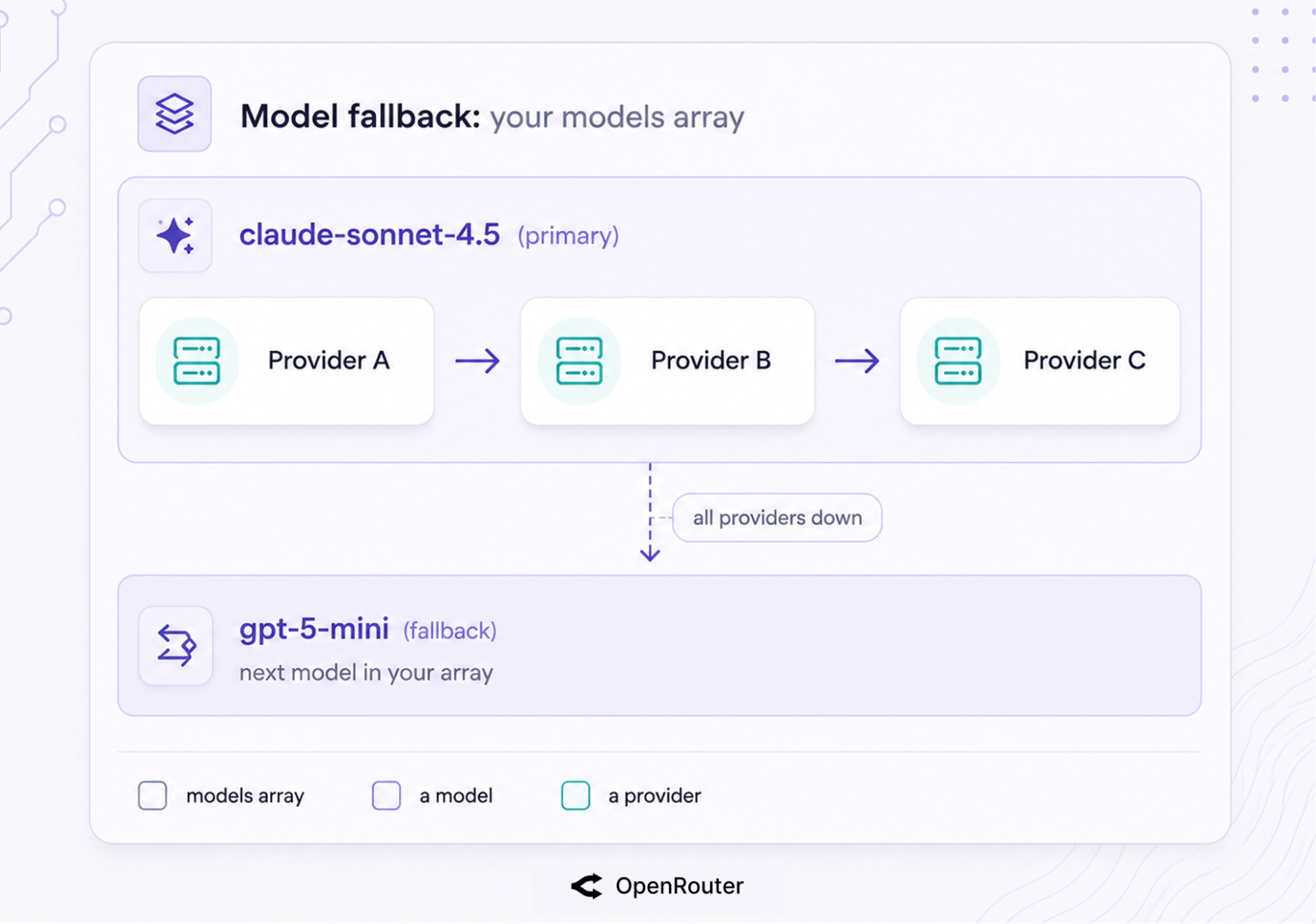
To survive provider errors, configure a models fallback array and rely on OpenRouter’s automatic provider failover. 2 mechanisms stack here, and they operate at different layers. Provider routing keeps a single model alive across providers, and model fallbacks handle the case where all providers for that model fail at once.
That covers most provider errors, but it doesn’t protect you from every service-wide outage. For a deeper look at the difference between provider failover and model fallbacks, and how to test them, see OpenRouter failover and fallbacks explained.
The short version: list backup models, let provider failover handle the rest, and you won’t pay for the requests that fail.
Model fallbacks (the models array)
Pass models in priority order. If the first errors, OpenRouter tries the next.
resp = client.chat.send(
    model="anthropic/claude-sonnet-4.6",
    models=["openai/gpt-5.4-mini"],  # tried in order if the primary fails
    messages=[{"role": "user", "content": "..."}],
)
The OpenRouter SDKs take models as a first-class field. (On the OpenAI SDK, pass it through extra_body, since it’s an OpenRouter extension.) Fallbacks trigger on context-length errors, moderation flags, rate-limiting, and downtime. You’re billed for the model that actually runs, not the ones that errored out first.
Provider-level failover (within one model)
Underneath model fallbacks, there’s a second safety net. Within a single model, if the chosen provider returns a 5xx or rate-limits you, OpenRouter automatically falls through to the next provider serving that model. This is on by default (allow_fallbacks: true), and any provider with an outage in the last 30 seconds gets deprioritized.
The economics make this safe to lean on. Failed requests aren’t billed; OpenRouter’s zero-completion insurance means you pay only for the run that completes.
What failover does and doesn’t cover
Failover has limits worth knowing about. Aborting a stream doesn’t stop billing on a subset of providers (Bedrock, Groq, Google, and Mistral among them, per the streaming docs), so a cancelled stream can still cost you on those.
And failover routes around provider-level failures, but it can’t route around OpenRouter itself: the August 2025 outage (a roughly 50-minute database incident) took the whole service down, fallbacks included. Provider failover is real and it’s automatic; it’s a layer of resilience rather than an SLA guarantee. Plan for both.
The Auto Router, and When to Use It
Send a request to openrouter/auto and you hand model selection to OpenRouter instead of picking yourself. Use it when the best model for a prompt varies, such as a mixed workload where some requests need strong reasoning and others need fast completion. When you know exactly which model you want, set it explicitly.
The Auto Router is powered by the wisdom of the market: it classifies your prompt into a task type, then ranks candidates by the aggregate spend of the OpenRouter community over a trailing 7-day window for that kind of task.
How the Auto Router picks
The pool tracks live market spend rather than a fixed lineup; the Auto Router docs explain how candidates are ranked. After the call, the response model field tells you which one actually answered, so you’re never guessing.
You steer the choice through request settings. cost_tier sets how much you’re willing to spend, from low (the cheapest capable models) through medium, high, and xhigh to max (the most capable models regardless of price). Leave it unset and the router picks from roughly the low band.
allowed_models keeps selection inside a provider family with wildcard patterns like anthropic/*.
{
  "model": "openrouter/auto",
  "plugins": [
    {
      "id": "auto-router",
      "cost_tier": "max",
      "allowed_models": ["anthropic/*", "openai/*"]
    }
  ]
}
On pricing, there’s no Auto Router surcharge. You pay the standard rate for whichever model gets selected, same as calling that model directly.
Auto Router vs a manual models array
Both are “routing,” but the control surface flips. With openrouter/auto, OpenRouter decides the model. With a models fallback array, you decide the order and OpenRouter just walks it on error.
Use the Auto Router when you don’t know what prompts users will send; use a fallback array when you know your model preference and want resilience behind it.
Router vs Gateway, and Where OpenRouter Sits
A gateway is the unified access point (one endpoint, auth, rate limiting, observability); a router makes the per-request decision (which model, which provider). OpenRouter is the gateway you call, and it includes routing logic that decides which model and provider handle each request.
| Capability | Router | Gateway | OpenRouter |
|---|---|---|---|
| Per-request model/provider decision | Yes | Access only | Yes |
| Automatic failover | Yes | Sometimes | Yes |
| Single unified endpoint | Sometimes | Yes | Yes |
| Managed vs self-hosted | Either | Either | Managed |
Our LLM gateway guide defines the gateway tier in full; routing is the mechanism inside it. If you want a self-hosted gateway-plus-router you run yourself, LiteLLM is the host-it option. OpenRouter is the call-it option.
Frequently Asked Questions
How does LLM routing work?
A router sits between your app and multiple models and providers, and decides where each request goes. It handles 4 jobs: model selection, provider selection, load balancing, and failover. You send one request to one endpoint, and the router picks the destination.
How does OpenRouter choose which provider to use?
By default it deprioritizes any provider with a significant outage in the last 30 seconds, then picks among the lowest-cost providers, weighted by the inverse square of price, and keeps the rest as fallbacks. Setting sort or order overrides this default.
What’s the difference between an LLM router and an LLM gateway?
A gateway is the unified access point (one endpoint, auth, observability). A router makes the per-request decision about which model and provider handle the call. OpenRouter is both: a gateway you call that also routes.
How do I make OpenRouter fail over to another model or provider?
Pass a models array in priority order for model-level fallback (triggers on context-length errors, moderation flags, rate limits, and downtime). For provider-level failover within one model, OpenRouter does it automatically by default (allow_fallbacks: true). Failed requests aren’t billed.
What do :nitro and :floor do?
:nitro appended to a model slug sorts providers by throughput and adds priority service tier endpoints to the pool. :floor sorts by price and adds flex tier endpoints. Both are one-line changes to the model string.
Does the Auto Router cost extra?
No. You pay the standard rate for whichever model openrouter/auto selects, with no additional Auto Router fee.