LLM-as-a-Judge: Score AI Agent Outputs Automatically
OpenRouter · · Updated
An agent can pass every deterministic test and still give a poor answer. A support agent can call the correct order lookup tool, retrieve the right policy, and then leave the refund window out of its response. The tool assertions pass, but nothing checked whether the final answer was accurate, complete, and useful.
LLM-as-a-judge evaluation covers that gap. A second model reviews the candidate agent’s output against criteria you write in plain language and returns a score. This gives you a repeatable way to test open-ended responses that have several valid wordings.
What LLM-as-a-judge is
You run a candidate, then give its output and any relevant tool results to a judge. The judge scores that evidence against a rubric you wrote. If the score falls below the threshold you set, the evaluation fails.
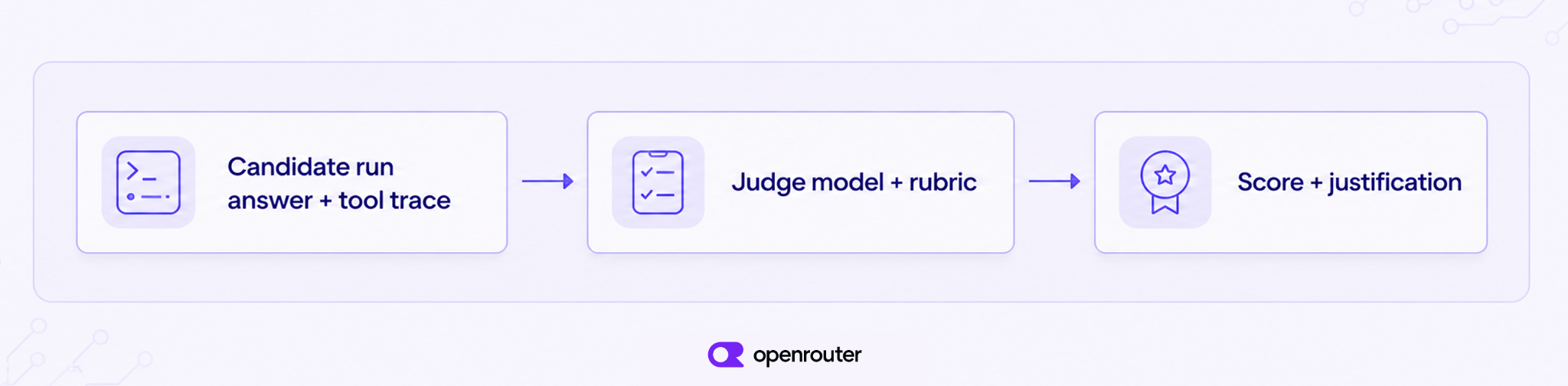
The judge is a model call like any other. It reads text, applies your criteria, and returns a number. Treat that number as a measurement taken with a fixed setup, not as ground truth.
Judge model vs candidate model
- The candidate is the system under test. It answers the user, calls tools, and writes the output you care about.
- The judge is a separate model. It does not solve the original task. It only grades what the candidate already did.
Keep those two roles on different models when you can. In the 2023 paper “Judging LLM-as-a-Judge with MT-Bench and Chatbot Arena”, Zheng et al. identify self-enhancement, position, and verbosity biases. A judge may favor an answer it generated itself, the answer shown in a preferred position, or a longer answer regardless of its quality.
Give the judge the visible response and only the tool results it needs to apply the rubric. If the judge can see the candidate’s hidden reasoning, the grade stops being independent.
Rubric scoring vs exact match vs human review
Exact match checks a string or a structured field against a fixture. Use it when exactly one value is correct.
Between exact match and a full rubric sits a deterministic content check that asserts a required phrase appears. In Ori Eval, that is run.toMention(). It fits when the answer must contain a specific term even though the wording around it is free.
A rubric is a short set of rules a person could apply. “Cites the 14-day window and does not invent exceptions” is a rubric. “Sounds helpful” is not.
Human reviewers define the quality bar, but a person cannot grade every run of a large evaluation set, and two reviewers can reach different conclusions on the same output. A judge is a repeatable stand-in that you check against a small human-labeled set.
Pointwise, pairwise, and reference-based scoring
LLM judges are used in three evaluation modes:
| Mode | What the judge receives | When to use it |
|---|---|---|
| Pointwise | One candidate output and a rubric | Enforce a quality threshold in CI or monitor production samples |
| Pairwise | Two candidate outputs and a comparison rubric | Compare models, prompts, or agent versions |
| Reference-based | A candidate output, a rubric, and a trusted reference | Check factual coverage against a known-good answer or source |
This guide uses pointwise scoring, because each run either meets the required standard or falls below it. For pairwise evaluation, grade both answer orders to detect position bias. Reference-based evaluation works when the reference contains facts the response must preserve, rather than wording it must copy.
When to use an LLM judge
Use an LLM judge when the requirement is clear but not a single exact output. Examples:
- Grounded responses. Check that the final answer uses retrieved data and does not introduce unsupported claims.
- Instruction following. Verify that the response follows requirements such as citing a policy, asking for missing information, or avoiding an action.
- Completeness. Confirm that the agent covers every part of a multi-part request.
- Tone. Evaluate whether a response follows a defined support, legal, or brand voice.
- Tool-use outcomes. Judge whether the agent used tool results correctly after deterministic tests confirm which tools ran.
An LLM judge is a poor fit when the result can be checked directly. Use a schema validator for JSON structure, a calculator for arithmetic, and unit tests for tool arguments and side effects. Rules that must always block an action should stay deterministic. A judge can audit the quality of the final response, but it should not be the only enforcement layer for a critical policy.
A tool-calling test might assert that the agent called lookup_order once and never called issue_refund without approval. The judge then scores whether the agent’s final answer accurately explains what happened. If you still need to build the execution layer, start with our tool calling guide.
Score an agent with Ori Eval
Ori Eval runs evaluations against your own prompts and agent behavior. An eval is a TypeScript file that runs with Bun’s test runner. Ori resolves one harness and one model for a run and holds them for every test in that run, so a prompt cannot change the configuration mid-run. A model-comparison file can still start a separate run for each candidate model.
The quickest way to start is through your coding agent. The command below is for the agent to run, not for you to paste into a terminal. Ask the agent to run it and then follow the instructions in its output:
curl -fsSL https://openrouter.ai/skills/spawn-ori-evalThe spawn-ori-eval skill installs Ori, makes sure you are signed in, asks what you want to evaluate, writes the eval, runs the candidate models, and recommends one with the scores, times, and costs behind the recommendation. It works in a temporary directory, so it does not add eval files to your project. Use the manual steps below when you want to keep the files in your project or inspect each part of the evaluation.
Ori’s setupJudge() function creates a separate grading agent on its own model, and autoEvals() scores a candidate run against your criteria. The example below tests a support agent that answers questions about refunds. It assumes your existing Ori harness can reach the support agent and its tools.
1. Install Ori and sign in
Install the Ori CLI, then authenticate once:
curl -fsSL https://openrouter.ai/labs/ori/install.sh | bash
ori login
Ori runs evaluation files with Bun. If Bun is not installed, ori eval asks for permission to install it. In CI or another noninteractive environment, the command stops and shows you how to install Bun. Your application does not need to be a TypeScript project.
2. Define one observable quality requirement
Begin with a failure you have seen or want to prevent. For this example, the agent must cite the 14-day refund window and must not invent policy exceptions.
That criterion is stronger than “give a helpful answer” because anyone can apply it without guessing what counts as helpful. It names both the required evidence and the failure condition.
3. Create the evaluation
Create evals/support/refund-quality.eval.ts:
import { test } from 'bun:test';
import { setupAgent, setupJudge } from 'ori/eval';

const agent = setupAgent();
const judge = setupJudge({ minScore: 0.8 });

test('explains the refund policy accurately', async () => {
  const run = await agent.run('Can I refund a digital order that I placed 10 days ago?');

  run.tool('lookup_refund_policy').toBeCalled();
  run.toComplete();

  await judge.autoEvals({
    criteria:
      'States the 14-day refund window, answers the question directly, and does not invent exceptions.',
    run,
  });
});
This test uses two evaluation layers. The run.tool() and run.toComplete() assertions check observable actions, and autoEvals() scores the meaning of the completed response. minScore sets the lowest score that passes. The 0.8 here is a starting value. Calibrate it against your own labeled responses, which the reliability section covers below.
setupJudge() grades with its own model, separate from the model under test. To grade with a different model, pass your own agent to setupJudge(). The Ori Eval docs show the call.
4. Run the evaluation
Run the test from your project directory:
ori eval --report eval-report.mdOri finds *.eval.ts files below the current directory, runs them with bun test, and exits with the exit code of bun test, so a failed evaluation fails the command. The --report flag writes a Markdown report you can review alongside the rest of your test output.
LLM evaluations make real model requests. Keep them in a separate CI job that runs manually, on a schedule, or before a release instead of adding them to every unit-test run. Store OPENROUTER_API_KEY as a repository secret. With that variable set, Ori does not need ori login in CI. The Run an eval in CI section of the Ori Eval docs includes a complete GitHub Actions example.
Compare the same agent across models
Once the pointwise evaluation works, you can run it against several candidate models. Keep the criteria and judge fixed while you do that. Passing { model } to setupAgent() selects the model for that run, so each iteration below runs its own model against the same criteria and judge.
import { test } from 'bun:test';
import { candidateModels, setupAgent, setupJudge } from 'ori/eval';

const judge = setupJudge({ minScore: 0.8 });

const candidates = await candidateModels({
  limit: 5,
  maxPromptPrice: 0.000005,
});

for (const model of candidates) {
  test(`refund policy response on ${model}`, async () => {
    const run = await setupAgent({ model }).run(
      'Can I refund a digital order that I placed 10 days ago?',
    );

    await judge.autoEvals({
      criteria:
        'States the 14-day refund window, answers the question directly, and does not invent exceptions.',
      run,
    });
  });
}
candidateModels() returns model slugs from our live catalog, so each one drops into the test name and into setupAgent({ model }). You can filter candidates by prompt or completion price, context length, required parameters, input modalities, quality indexes, and whether a model is expiring. Prices are per token, so maxPromptPrice: 0.000005 is a ceiling of five dollars per million input tokens.
Dynamic selection is useful for discovering models. For regression tests, name the candidate model explicitly so the test does not compare a different set when the catalog changes, and use assertModelIsLive(slug) so the eval fails with a clear message if that model leaves the catalog. Record the candidate, judge, harness, rubric, model parameters, and test data with each result.
Make the judge reliable
Check the judge against examples a person has already labeled. Until you have done that, its scores are unproven. The rest of this section keeps that check valid as the setup changes.
Write criteria around observable evidence
Replace broad quality labels with requirements the judge can locate in the response.
- Weak. “The response is accurate and helpful.”
- Better. “The response states the 14-day refund window, uses the retrieved order date, and does not claim that the refund has already been issued.”
Keep unrelated dimensions separate when you need to diagnose failures. A single score for accuracy, tone, completeness, and formatting can tell you that quality dropped without telling you why.
Ori exports a startingCriteria object with editable rubrics for accuracy, completeness, instructionFollowing, safety, structuredOutput, and toneAndVoice. Pass one to judge.autoEvals() as the criteria value. Treat them as a base to specialize. “Uses the retrieved order status and does not promise a refund before approval” tells the judge more than a generic accuracy rubric.
Calibrate the judge with human-labeled examples
Create a small dataset containing clear passes, clear failures, and borderline cases from realistic agent interactions. Ask the people responsible for quality to score them first, then compare the judge’s decisions with those labels.
When the judge disagrees, inspect the cause. The rubric may be vague, the example may expose a missing criterion, or the judge model may be a poor fit. Repeat this calibration when you change the judge, rubric, or evaluation data.
Put your labeled question-and-answer pairs in a JSON file and drive them with test.each:
import supportPairs from './support-pairs.json';

test.each(supportPairs)('answers: $question', async ({ question, mustMention }) => {
  const run = await agent.run(question);
  run.toMention(mustMention);
  run.toComplete();
});
Keep the evaluation blind
Give the judge only the information required to apply the rubric. That is the original task, the visible answer, relevant tool results, and any trusted reference material. Remove the candidate model name and other signals that could influence the score.
For pairwise evaluations, run the comparison twice with the answers in opposite positions. If the outcome changes, check the result again rather than forcing a winner.
Control changes and account for variance
Save the exact rubric and test dataset in version control. Record the candidate and judge model slugs, harness version, routing configuration, and generation settings with the score.
This makes changes traceable, but it does not make model output deterministic. A small score movement near the threshold may be normal variation. A repeated drop across a representative test set is stronger evidence of a regression.
Protect production data
Real data from your users makes better test cases than prompts you invent. Remove personal or sensitive data before adding production traces to an evaluation dataset, and review the data policies for the models and providers involved. Our data collection documentation explains our logging controls and how we handle request metadata.
Manage evaluation cost
LLM judging adds model requests to every evaluated run, so the cost grows with the number of test cases, candidate models, and rubric dimensions.
You can control that cost by:
- Running deterministic checks on every commit and LLM evaluations on a schedule or before a release.
- Sampling representative production traces instead of scoring every interaction.
- Using one focused judge call instead of several overlapping criteria.
- Testing a smaller candidate set during routine regression checks.
- Sending only the context the judge needs to apply the rubric.
The judge does not need to be the largest model available. It needs to follow detailed scoring instructions consistently. Use our model catalog to compare current capabilities and prices rather than copying a fixed price into the evaluation.
Next steps
Start with one real failure, write a criterion another reviewer can apply, and test the judge against human-labeled examples. The Ori Eval guide covers the eval file format, candidateModels(), setupJudge(), --baseline comparisons, and running evals in CI.
For closed criteria where you need a calibrated probability rather than a written verdict, such as whether a claim is supported by a source, a decision model can replace the judge call. Jev vs LLM-as-a-Judge measures both on the same tasks and shows where each one holds up.
Frequently asked questions
What does LLM-as-a-judge mean?
LLM-as-a-judge means using one language model to evaluate another system’s output against written criteria. The candidate produces the answer, and a separate judge model scores it.
How do you score AI agent outputs automatically?
Run the agent on a test prompt and capture its answer and the relevant tool trace. Give that evidence to a judge model with a specific rubric, then store the score and fail the evaluation when it falls below a threshold you calibrated against human-reviewed examples.
How accurate is LLM-as-a-judge evaluation?
Accuracy depends on the judge model, rubric, task, and test data. LLM judges can agree with human preferences at useful rates, but they also show biases and output variance. Measure agreement on your own human-labeled examples before relying on a judge for release decisions.
Can the same LLM judge its own output?
It can, but the model may favor its own style or repeat the same blind spots. Use a separate judge model when possible. If you must use the same model, keep the judge request separate, hide unnecessary candidate context, and validate the scores against human labels.
What makes a good LLM judge rubric?
A good rubric names observable evidence, defines the failure conditions, and gives the judge enough context to reach the same decision as a knowledgeable reviewer. Replace “be helpful” with requirements such as “states the 14-day window and does not invent an exception”.
Should I use pointwise or pairwise LLM evaluation?
Use pointwise evaluation when each agent run must meet a fixed quality bar. Use pairwise evaluation when comparing two models or prompt versions. For pairwise tests, reverse the answer order to check whether position affects the result.
When should I avoid using an LLM as a judge?
Avoid it when code can determine the result exactly. Schemas, calculations, tool arguments, permissions, and critical enforcement rules should use deterministic checks. Use the judge for semantic qualities that those checks cannot measure.