How to Get the Lowest-Cost LLM Inference on OpenRouter
OpenRouter · · Updated

Since you’re here, you already know the model isn’t the only cost variable. The same model can cost several times more on one provider than another, and that spread compounds fast at scale.
This guide shows you the exact config to capture the lowest price automatically, plus the gotchas that raise your bill if you miss them.
If you already got a billing surprise, start with the gotchas section. If you want to know whether the 5.5% platform fee is worth it, the cost math is in the decision table at the bottom. If you just want the cheapest provider for a model you’ve already chosen, append :floor to your model slug and skip to that section.
Tl;dr
- Start with free models. OpenRouter has 20+ at $0 token cost. A free account gets 50 requests per day. Add $10 in credits once and that jumps to 1,000 per day.
- The default router already favors cheaper providers. You don’t need to configure anything to benefit from it.
- Append
:floorto any model slug to always route to the cheapest provider for that model. - Use
max_pricewhen you need a hard budget cap. If no provider qualifies, the request fails instead of spending more than you planned. - The cheapest listed price is sometimes a quantized endpoint. Use the
quantizationsfilter orprovider.ignoreif precision matters for your workload.
Not sure which lever applies to your situation? This diagram shows you where to start:
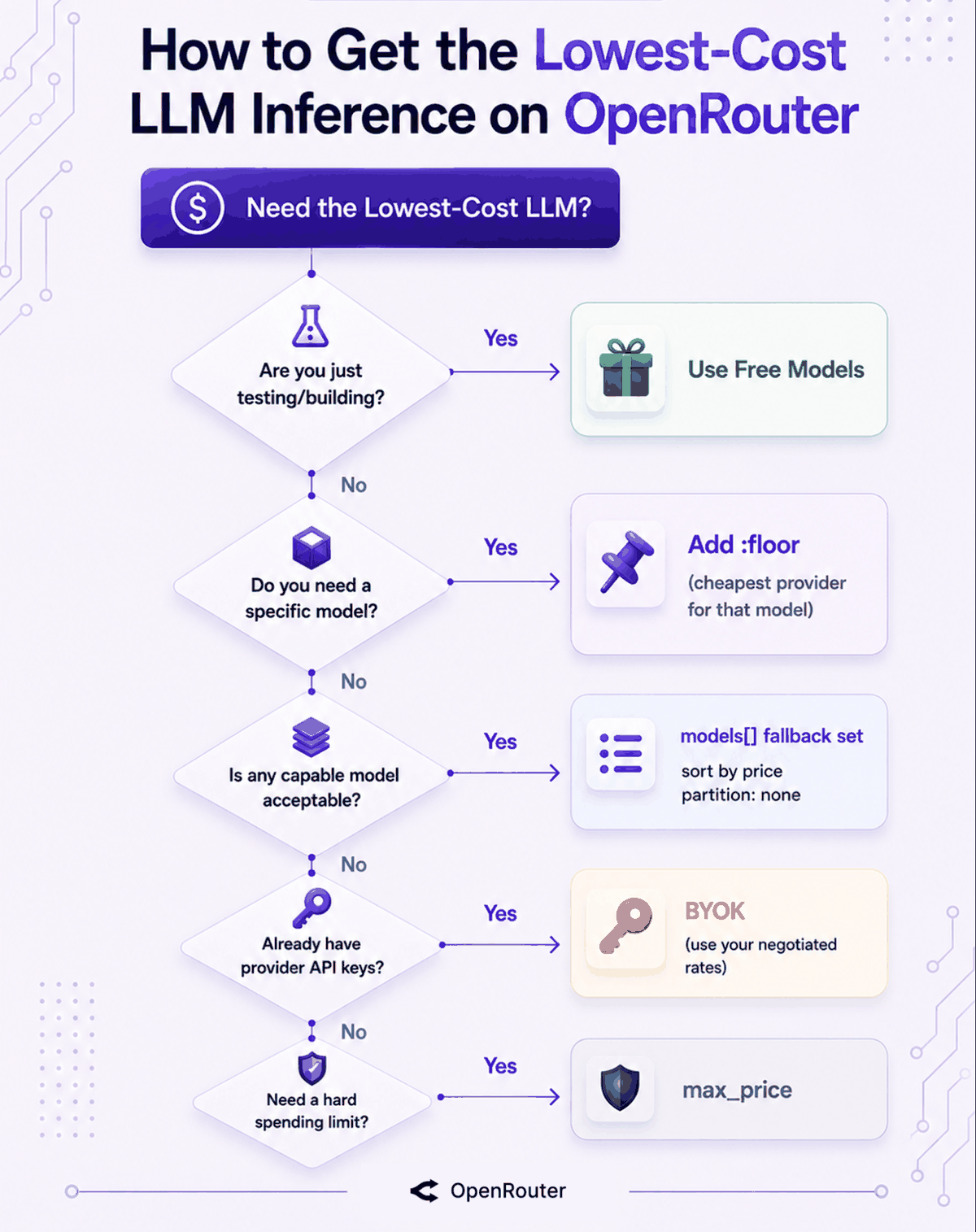
What Is the :floor Cost Shortcut?
Every model on OpenRouter is available through multiple providers, and they don’t all charge the same price. For Llama 3.3 70B alone, input pricing runs from $0.10 to over $1.00 per million tokens depending on who’s serving it.
Appending :floor to your model slug tells the router to always pick the cheapest one. It’s exactly the same as setting provider.sort: "price" in the request body. One string change:
from openai import OpenAI

client = OpenAI(
    base_url="https://openrouter.ai/api/v1",
    api_key="$OPENROUTER_API_KEY",
)

resp = client.chat.completions.create(
    model="meta-llama/llama-3.3-70b-instruct:floor",  # routes to the cheapest provider
    messages=[{"role": "user", "content": "Classify this ticket."}],
)
The same in TypeScript:
import { OpenRouter } from '@openrouter/sdk';

const openRouter = new OpenRouter({ apiKey: process.env.OPENROUTER_API_KEY });

const completion = await openRouter.chat.send({
  model: 'meta-llama/llama-3.3-70b-instruct:floor',
  messages: [{ role: 'user', content: 'Classify this ticket.' }],
  stream: false,
});
Its counterpart is :nitro, which sorts by throughput instead of price. The two are worth knowing together:
| Suffix | Equivalent to | Optimizes for |
|---|---|---|
:floor | provider.sort: "price" | Lowest price |
:nitro | provider.sort: "throughput" | Highest throughput |
The tradeoff with :floor is that it disables load balancing and locks onto the cheapest endpoint, which may not be the most reliable on a given day.
For batch jobs, document processing, and offline workloads where a few extra seconds don’t matter, that’s a fine trade. For real-time user-facing calls, think twice. If the cheapest endpoint turns out to be a degraded one, the gotchas section below shows you how to exclude it.
How OpenRouter Picks a Cheap Provider by Default
Before reaching for any routing config, it helps to understand what’s already running for you. Even without any explicit settings, OpenRouter’s default already tilts toward cheaper providers.
Here’s the exact strategy:
- Skip providers that have seen significant outages in the last 30 seconds.
- Among the stable providers, pick from the lowest-cost candidates, weighted by the inverse square of the price.
- Use the rest as fallbacks.
The inverse-square weighting is what makes this useful. Say Provider A costs $1/M, Provider B costs $2/M, and Provider C costs $3/M, and Provider B recently had a few outages. Your request goes to Provider A first, roughly 9x more likely than Provider C, because 1 divided by 3 squared equals 1/9. If A fails, C is next. B comes last because of the outage record. Cheap and stays-up are balanced automatically.
We built this weighting because we learned the hard way what naive flat-price routing produces. Sending everything to the cheapest provider sounds right until that provider becomes the first to saturate under load, the first to degrade, and the slowest to recover. We run this across 80+ providers at roughly 100 trillion tokens per month, and the inverse-square approach is what keeps cost savings from coming at the expense of reliability.
One thing to keep in mind: setting sort or order in your provider preferences turns this load balancing off entirely. The next section shows you when you’d want to override it.
How Do I Set a Hard Price Ceiling with max_price?
:floor routes to the cheapest provider. max_price does the opposite job: it blocks requests from going to any provider above the price you set. Where :floor finds the bottom, max_price enforces a ceiling.
For a budget guarantee, the max_price object in the provider field caps what you’ll pay per million tokens:
resp = client.chat.completions.create(
    model="meta-llama/llama-3.3-70b-instruct",
    messages=[{"role": "user", "content": "Draft a release note."}],
    extra_body={
        "provider": {
            "max_price": {"prompt": 1, "completion": 2}
        }
    },
)
This routes only to providers at or below $1/M for input tokens and $2/M for output. If every available provider is more expensive, the request fails. That’s intentional. You’d rather see an error than a charge you didn’t plan for.
The combination that tends to be most useful is max_price paired with sort: "throughput":
"provider": {
    "sort": "throughput",
    "max_price": {"prompt": 1, "completion": 2}
}
This gives you the fastest available provider, as long as it costs no more than $1/M for input and $2/M for output. Speed-optimized routing with a hard budget guarantee in one config.
What Is the Cheapest Model That Is Still Good Enough?
Provider routing reduces costs for a model you’ve already chosen. Picking a cheaper model is the bigger lever. The difference between a frontier model and a capable open-weight model is often 10x to 50x per token.
Open-weight models like DeepSeek V4, Llama 3.3 70B, Qwen, and Mistral handle most production tasks well: document processing, classification, summarization, code generation, structured output extraction. For the majority of workloads, they’re the right choice.
The price spread across providers for the same model makes the routing argument concrete. Here’s Llama 3.3 70B across four providers:
| Provider (Llama 3.3 70B) | Input $/M | Output $/M |
|---|---|---|
| DeepInfra | $0.10 | $0.32 |
| Novita | $0.135 | $0.40 |
| Groq | $0.59 | $0.79 |
| Together | $1.04 | $1.04 |
Output pricing alone swings from $0.32 to over $1 per million tokens for the same model, with some endpoints above $2. That’s the whole argument for letting a router pick the cheapest qualifying provider instead of hardcoding one.
The advanced move: cheapest model that clears a performance floor
If you’re flexible on which model handles a request, you can give OpenRouter a set of acceptable models and let it find the cheapest endpoint across all of them that still meets a throughput threshold. Setting partition: "none" tells the router to sort globally across all models by price instead of always trying the first model first:
const completion = await openRouter.chat.send({
  models: [
    'anthropic/claude-sonnet-4.5',
    'openai/gpt-5-mini',
    'google/gemini-3-flash-preview',
  ],
  messages: [{ role: 'user', content: 'Summarize this PR.' }],
  provider: {
    sort: { by: 'price', partition: 'none' },
    preferredMinThroughput: { p90: 50 },
  },
  stream: false,
});
This routes to the cheapest model-and-provider combination across all three that delivers at least 50 tokens per second at p90. For coding tasks specifically, open-weight models like DeepSeek V4 and Qwen3 Coder hit a strong price-to-quality ratio.
How Does BYOK Cut Costs?
If you already have API keys with a provider, whether through a direct contract, negotiated rates, or existing credits, BYOK (Bring Your Own Key) lets you route through OpenRouter using those keys. You keep your provider relationship and pricing. OpenRouter adds routing, failover, and observability on top.
The fee is 5% of what the same model and provider would normally cost on OpenRouter. The current free allowance is plan-dependent and measured by list-price inference cost; see the pricing page for details.
We see teams assume BYOK is always cheaper because they’re using their own keys. It only beats standard pay-as-you-go when your direct provider rate, minus the 5% fee above the plan allowance, is lower than OpenRouter’s no-markup catalog price. Compare your expected list-price inference spend with the current allowance before assuming it saves money.
For BYOK across a fallback set, partition: "none" helps here too. If your primary model doesn’t have a BYOK provider configured but a fallback does, this lets OpenRouter route to the fallback that uses your key, keeping more traffic on your own pricing:
const completion = await openRouter.chat.send({
  models: ['anthropic/claude-sonnet-4.5', 'openai/gpt-5-mini'],
  messages: [{ role: 'user', content: 'Hello' }],
  provider: { sort: { by: 'price', partition: 'none' } },
  stream: false,
});
Are There Free LLM Models for Hobby Projects?
Yes. OpenRouter has 20+ free models, callable via the same endpoint and API key you use for everything else, with $0 token cost. For a side project or a weekend prototype, you don’t need to spend anything to get started.
The roster includes models like Llama 3.3 70B, Qwen3 Coder, GPT-OSS 120B, and NVIDIA Nemotron 3 Super, among others. These are solid models that are more than enough for prototyping and early validation.
Free models run the same request shape as paid ones. All you have to do is change the model string to a free slug, and you’re done:
curl https://openrouter.ai/api/v1/chat/completions \
  -H "Authorization: Bearer $OPENROUTER_API_KEY" \
  -H "Content-Type: application/json" \
  -d '{
    "model": "meta-llama/llama-3.3-70b-instruct:free",
    "messages": [{"role": "user", "content": "Summarize this changelog in two lines."}]
  }'
You can browse the full list at openrouter.ai/models?max_price=0, or let the Free Models Router pick one for you automatically.
The catch: free-tier rate limits
A free account gets 50 requests per day and 20 requests per minute. When you add $10 or more in credits, the free-model ceiling is raised to 1,000 requests per day, still at 20 RPM. That single deposit never expires.
| Account state | Requests/day (free models) | Requests/minute |
|---|---|---|
| Free account | 50 | 20 |
| $10+ in credits | 1,000 | 20 |
Before you build on free models, you should also know that context windows on free endpoints are sometimes smaller than their paid equivalents, so a long-context job that works on paid can truncate on free. And failed requests still count against your daily quota, so a misconfigured retry loop can burn through your allowance before producing anything useful.
The Cost Gotchas Worth Knowing
The cheapest sticker price isn’t always the cheapest real cost. A few things raise your bill if you don’t plan for them.
The cheapest endpoint can be a quantized one
When output quality drops unexpectedly, most developers assume the model changed or the provider updated something. A possible cause is quantization. Some providers serve quantized model weights at lower prices: FP8, FP4, INT8. Your application still returns a response. It’s just different from what the full-precision weights would produce, and nothing in your logs tells you why.
To be fair, quantization isn’t automatically worse. Our own benchmark analysis found aggressively quantized endpoints that match full-precision competitors. But if your workload is sensitive to precision, you have two levers.
Exclude a specific provider:
"provider": {
    "sort": "price",
    "ignore": ["provider-slug"]
}
Or require higher-precision serving with the quantizations filter:
"provider": {
    "sort": "price",
    "quantizations": ["fp16", "bf16"]
}
The 5.5% platform fee belongs in every cost calculation
We don’t mark up provider token pricing, but pay-as-you-go credit purchases carry a 5.5% platform fee. On a $100 top-up, that’s $5.50 off your inference budget. It’s on the pricing page, it’s not hidden, but it’s the number that makes some comparisons misleading.
Any cost math that compares OpenRouter token rates to direct provider rates without including this fee is incomplete.
Canceling a stream does not always stop the bill
If you abort a streaming request mid-response, OpenRouter stops billing on providers that support stream cancellation. Bedrock, Groq, Google, Mistral, and several others don’t.
If your application cancels streams frequently, whether from user cancel buttons, timeouts, or agent loops that short-circuit early, check which providers support cancellation before relying on it as a cost control.
Failed free-tier requests still count against your quota
If a free model request fails from a rate limit, provider outage, or timeout, it still burns one of your 50 or 1,000 daily requests. A retry loop that misfires can exhaust your quota before producing anything useful. Add retry logic with backoff if you’re building on free endpoints.
Putting It Together: A Cost Decision Rule
Here’s the whole thing as a use-this-when table:
| Your situation | What to do | Config |
|---|---|---|
| Just testing or a hobby project | Free models, $0 | model: "...:free" |
| Need a specific model at the lowest price | Add :floor | model: "...:floor" |
| Any capable model works | Fallback set, price-sorted with a throughput floor | sort: { by: "price", partition: "none" } + preferredMinThroughput |
| Hard budget cap | Add a price ceiling | provider: { max_price: { prompt: 1, completion: 2 } } |
| Already paying a provider directly | BYOK | Configure your key; see pricing for the free allowance |
| Cheapest but worried about quality | Exclude providers or filter by precision | ignore: ["provider"] or quantizations: ["fp16", "bf16"] |
| Cheapest with reliability | Leave the default alone | No config needed |
The throughline: cheap on OpenRouter is a config decision you make once. If your workload repeats the same long prompt across turns, prompt caching and sticky routing cut input cost on top of any of these routing choices.
For the full routing mechanics behind these levers, see the provider routing reference and model fallbacks.
Frequently Asked Questions
Is OpenRouter cheaper than going directly to a provider?
On token pricing, no. We pass through provider rates without markup. Where it saves money is routing: access to cheaper providers you may not have accounts with, automatic failover so failed requests don’t waste compute, and batch work routed to the cheapest available endpoint without you maintaining that logic. The real cost to account for is the 5.5% platform fee on credit purchases. At $500 per month in inference, that’s $27.50. Whether it’s worth it depends on how much engineering time you’d otherwise spend managing providers.
What is the cheapest model on OpenRouter?
Free models cost $0 in tokens. The roster includes Llama 3.3 70B, Qwen3 Coder, GPT-OSS 120B, and NVIDIA Nemotron 3 Super, limited to 50 requests per day without credits or 1,000 per day with $10 or more loaded. For paid inference, open-weight models with :floor routing give you the cheapest provider for that model automatically.
Are OpenRouter’s free models really free?
Yes, $0 per token. The limits are 50 requests per day on a free account and 1,000 per day once you add $10 in credits, both at 20 RPM. Context windows on free endpoints are sometimes smaller than the paid version.
How do I always use the cheapest provider?
Append :floor to your model slug or set provider.sort: "price" in the request body. Both do the same thing.
Is the cheapest LLM API good enough for coding?
For routine coding tasks, yes. Open-weight models like Qwen3 Coder and DeepSeek V4 handle boilerplate, refactoring, code review, and documentation at a fraction of frontier model prices. Frontier models still hold a clear edge on complex architecture and hard debugging, so save the expensive calls for the work that needs them.
Does OpenRouter charge for failed requests?
No. You pay only for successful completions. Failed and fallback requests are not billed.