Image Generation Models Compared: Cost, Edit, Quality
OpenRouter · · Updated
We route more than 50 image generation models through one API. We ran the same prompt through 20 of them and recorded what each call billed, what it returned, and what it accepts.
Cost is the hard part, because these models are not sold in the same unit. FLUX.2 is priced per megapixel. Gemini, OpenAI, and Microsoft MAI are priced per token. Grok, Recraft, Riverflow, Qwen, and Seedream are priced per image, at a rate that changes with the quality and resolution you ask for. Each model page is correct in its own unit, so you cannot compare two of them by reading their prices side by side.
We put them on the same footing. The 20 models we tested all got the same prompt at the same size, and we read the usage.cost field from each response, which is the amount we charged.
Every price on this page came from a real generation, measured on 11 September 2026. Prices and models change often, so treat any figure more than a month old as a hint rather than a budget line. You can re-pull the current state with
GET /api/v1/images/modelsfor accepted parameters andGET /api/v1/images/models/{model}/endpointsfor pricing with the unit named.
Summary
- Start with openai/gpt-image-2. It billed $0.006 on a short prompt and $0.0135 on a longer one, which made it the cheapest model we measured, and it rendered our two-line label and our reference edit correctly.
- Reach past it for sourceful/riverflow-v2.5-pro at $0.064 when the image is hard to get right, google/gemini-3-pro-image at $0.134 when the reply needs words as well as a picture, and recraft/recraft-v4.1-vector at $0.08 when you need editable SVG instead of pixels.
- One image at default settings billed between $0.006 and $0.134 across the 20 models we measured, a 22x spread.
- Every model page quotes its price in its own unit, and the billed cost can differ from the listed rate. The way to compare two models is to generate one image with each and read
usage.costoff the response. - On OpenAI models, the
qualitysetting moved the same image from $0.006 to $0.211. n, the number of images you get back from one call, is capped at 1 on FLUX.2, Gemini, Grok, Riverflow, and MAI.seeddoes not exist on Gemini, Grok, OpenAI, Riverflow, Recraft, or MAI. Where it exists on FLUX.2 Klein, the same seed reproduced the image byte for byte.- Five of the six models we asked for readable text rendered it correctly, including the cheapest one.
- The raw API returns
data[0].b64_json. The TypeScript SDK returnsdata[0].b64Json.
What each model billed us
We sent each of these 20 models the prompt “A studio packshot of a glass bottle, hard key light, no text.” with aspect_ratio: "1:1" and no other settings, then read usage.cost off the response. The tables in this post show usage.cost rounded to four decimal places. The billing unit column is the unit field from each endpoint’s pricing record.
| Model | Billed | Returned | Format | Billing unit |
|---|---|---|---|---|
| openai/gpt-image-2 | $0.0060 | 1024x1024 | PNG | token |
| black-forest-labs/flux.2-klein-4b | $0.0140 | 1024x1024 | JPEG | megapixel |
| sourceful/riverflow-v2.5-fast | $0.0176 | 1024x1024 | WebP | image |
| black-forest-labs/flux.2-pro | $0.0300 | 1024x1024 | JPEG | megapixel |
| qwen/qwen-image-3 | $0.0300 | 1024x1024 | PNG | image |
| krea/krea-2-medium | $0.0300 | 1024x1024 | PNG | not published |
| openai/gpt-image-1-mini | $0.0333 | 1024x1024 | PNG | token |
| google/gemini-3.1-flash-lite-image | $0.0336 | 1024x1024 | JPEG | token |
| recraft/recraft-v4.1 | $0.0350 | 1024x1024 | WebP | image |
| bytedance-seed/seedream-5-0-lite | $0.0350 | 2048x2048 | JPEG | image |
| microsoft/mai-image-2.5 | $0.0482 | 1024x1024 | PNG | token |
| black-forest-labs/flux.2-flex | $0.0500 | 1024x1024 | JPEG | megapixel |
| x-ai/grok-imagine-image-quality | $0.0500 | 1024x1024 | JPEG | image |
| x-ai/grok-imagine-image-2.0 | $0.0600 | 1024x1024 | JPEG | image |
| sourceful/riverflow-v2.5-pro | $0.0641 | 1024x1024 | WebP | image |
| google/gemini-3.1-flash-image | $0.0672 | 1024x1024 | PNG | token |
| black-forest-labs/flux.2-max | $0.0700 | 1024x1024 | JPEG | megapixel |
| recraft/recraft-v4.1-vector | $0.0800 | vector | SVG | image |
| bytedance-seed/seedream-5-0-pro | $0.0900 | 2048x2048 | JPEG | image |
| google/gemini-3-pro-image | $0.1344 | 1024x1024 | PNG | token |
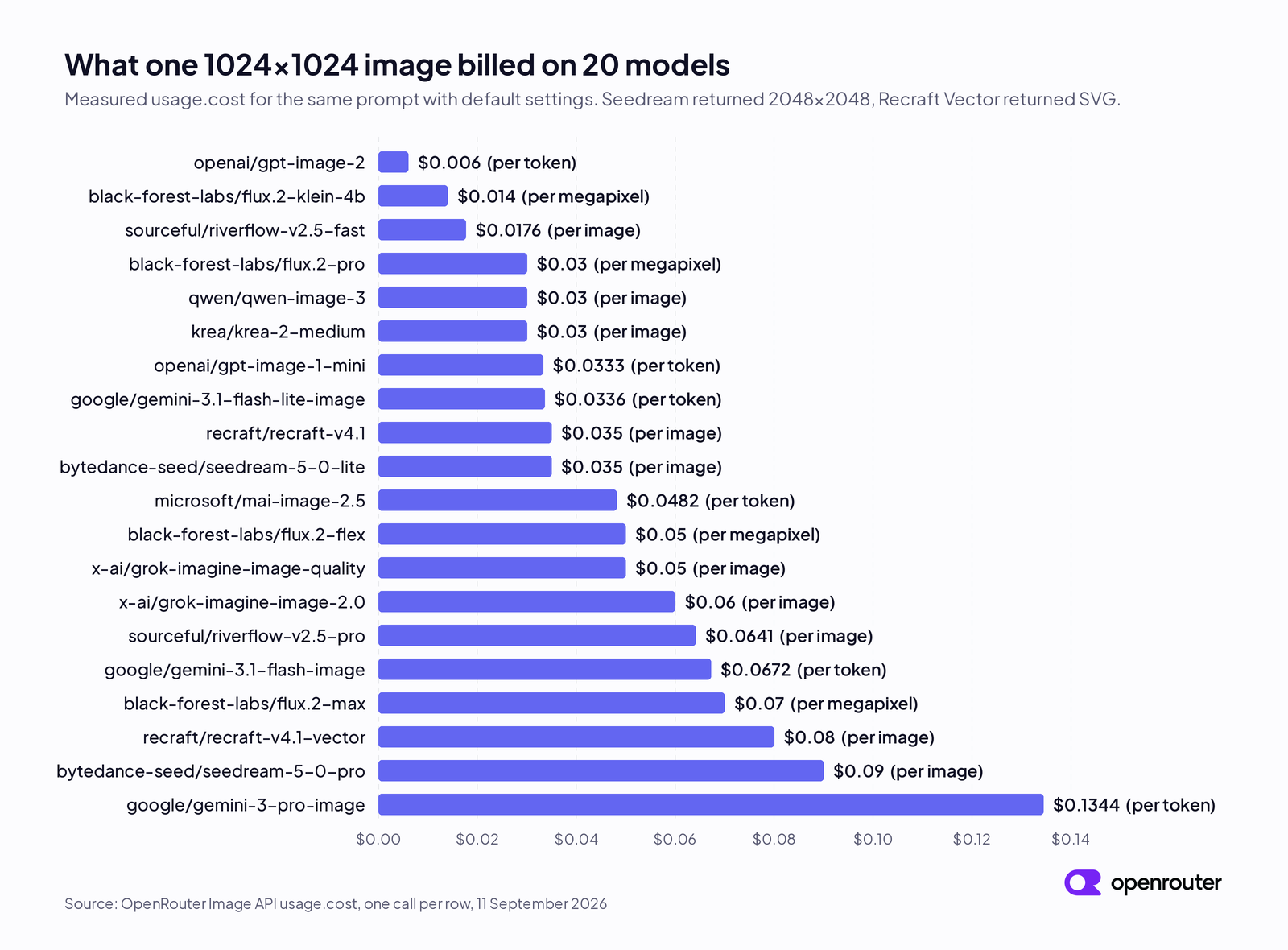
Figure 1. The same prices, sorted. The three billing units are mixed all the way up the range, so the unit does not tell you where a model lands in it.
Three things to know before you budget from this table.
- Both Seedream models returned 2048x2048 instead of 1024x1024 when we left
resolutionunset. Seedream 5.0 Lite lists2Kas the lowest resolution it accepts. Seedream 5.0 Pro accepts1K, but its default call returned 2K and billed its $0.09 high-resolution rate rather than its $0.045 base rate. Seedream 5.0 Lite gives you four megapixels for $0.035, so per pixel it is cheaper than the table makes it look. - FLUX.2, Grok, and Seedream returned JPEG. OpenAI, Qwen, Microsoft, and Krea returned PNG. Sourceful and Recraft returned WebP, and Recraft’s vector model returned SVG. The three Gemini models we tested do not accept
output_format, and they did not all return the same format, so do not hard-code a file extension. Setoutput_formaton the catalog models that accept it. On the ones that do not, read themedia_typefield that comes back with every response. - Two calls to
sourceful/riverflow-v2.5-fastwith the same request body billed $0.017623 and $0.017639. Budget from an average of several calls rather than from one.
The quality setting moves the price 35x
On OpenAI models, quality changes your bill more than any other setting. We ran gpt-image-2 with the same prompt at the same 1024x1024 size with quality unset, set to low, and set to high.
| quality | Image tokens | Billed |
|---|---|---|
| unset | 196 | $0.0060 |
| low | 196 | $0.0060 |
| high | 7,024 | $0.2108 |
Leaving quality unset gave us the same token count and bill as low. Set quality explicitly when the image matters, and treat a per-image price for an OpenAI model as incomplete unless it names the quality tier. The high call also took 123 seconds to return against 12 seconds for the default call.
Aspect ratio moves the bill much less
On a per-megapixel model, the frame you ask for changes the bill, but by less than the pixel count suggests. We ran black-forest-labs/flux.2-klein-4b at two shapes. The 21:9 call returned 2400x1024, which is 2.46 megapixels against 1.05 for the square. We were billed $0.014 for the square and $0.016 for the wide crop.
Listed rates and billed cost can differ
Each model publishes a rate on its page and on the API’s endpoints route. Those rates are a planning number, and the response is what you pay. On 11 September 2026, sourceful/riverflow-v2.5-pro listed $0.13 per image at its default resolution and billed us $0.064. black-forest-labs/flux.2-flex listed $0.06 per megapixel and billed us $0.05 for a one-megapixel image. black-forest-labs/flux.2-max listed $0.07 and billed us exactly $0.07. krea/krea-2-medium published no pricing record on its endpoint and billed us $0.03.
When the two disagree, read usage.cost rather than multiplying a listed rate by an estimate.
We bill a completed image request in full and charge nothing for one that fails. The Image API billing documentation describes which outcomes are billed.
References, formats, and limits
Price is one axis. These are the others, and two of them rule models out before cost matters at all. The values come from each endpoint’s supported_parameters on 11 September 2026.
| Family | Output modalities | Max reference images | output_format | Images per call (n) | seed |
|---|---|---|---|---|---|
| FLUX.2 Klein | image | 4 | png, jpeg | 1 | yes |
| FLUX.2 Flex, Pro, Max | image | 8 | png, jpeg | 1 | yes |
| Gemini 3.x image | image, text | 14 | not settable | 1 | no |
| Grok Imagine Image | image | 3 | not settable | 1 | no |
| OpenAI gpt-image | image | 16 | not settable | 1 to 10 | no |
| OpenAI gpt-5-image | image, text | 16 | not settable | 1 to 10 | no |
| Seedream 5.0 | image | 14 | not settable | 1 to 4 on Lite, 1 on Pro | yes |
| Recraft v4.1 | image | 1 | svg on the vector model | 1 to 6 | no |
| Qwen Image 3 | image | 4 | not settable | 1 to 6 | yes |
| Riverflow 2.5 | image | 4 on Fast, 10 on Pro | jpeg on Fast, png, jpeg, webp on Pro | 1 | no |
| Microsoft MAI Image 2.5 | image | 1 | not settable | 1 | no |
| Krea 2 Medium | image | 1 | not settable | n not published | yes |
A reference image is one you send with the request for the model to work from, either an image you want edited or an example of the style or product you want matched. The limit on how many you can send is a hard ceiling. Grok takes three and Gemini takes fourteen, so a six-image brand kit rules Grok out before you compare anything else.
The output modalities column is the second axis. Most of these models take text and images in and return only image bytes. The Gemini image models and OpenAI’s gpt-5-image models can also return written text in the same reply, which matters if you want the model to explain what it made. We tested how reliably they do that further down.
Re-pull this table for any model with
GET /api/v1/images/models, which publishes each model’s accepted parameters and their ranges. A parameter that is absent fromsupported_parametersis not supported on that endpoint.
Seed reproduced the image exactly on FLUX.2 Klein
seed is the number you send to make a result repeatable. It is missing from every Gemini, Grok, OpenAI, Riverflow, Recraft, and MAI image model on our catalog. It exists on FLUX.2, Seedream, Qwen, and Krea.
We ran black-forest-labs/flux.2-klein-4b twice with the same prompt and seed: 424242. The two responses were identical byte for byte, and both billed $0.014. We only tested Klein, so treat the other seed-capable models as untested rather than assuming they behave the same way. For comparison, two sourceful/riverflow-v2.5-fast calls with no seed parameter returned two different images from the same request body.
What the leaderboards say
We show Design Arena ratings on each model’s page. When we pulled the current ratings through our benchmarks API on 11 September 2026, sourceful/riverflow-v2.5-pro had the highest rating on both the image board and the image editing board. Microsoft’s MAI Image 2.6 models and Google’s Gemini image models followed on the image board, and black-forest-labs/flux.2-klein-4b had the lowest rating of the models listed on both boards.
Those ratings come from head-to-head votes between models, which Design Arena turns into an Elo rating, a score that rises when a model wins a matchup and falls when it loses.
Two caveats. The Gemini ratings sit on the -preview versions of those slugs rather than the general release slugs we link on this page. And Elo tells you what voters preferred on their prompts, not yours. The top-rated model billed $0.064 per image in our run and the lowest-rated one billed $0.014. Shortlist from the board, then decide from your own prompts.
We ran one prompt through six models
We sent one prompt to six models across the price range and put the bill under each image. We asked for a matte black coffee bag with two lines of text printed on it.
Prompt
A studio packshot of a matte black coffee bag on a plain white background, hard key light. Printed across the front of the bag in clean sans-serif capitals are the words OPENROUTER ROASTERS, and beneath that in smaller capitals the words SINGLE ORIGIN.
We picked readable words because they are easy to grade. Either the bag says what you asked for or it does not.
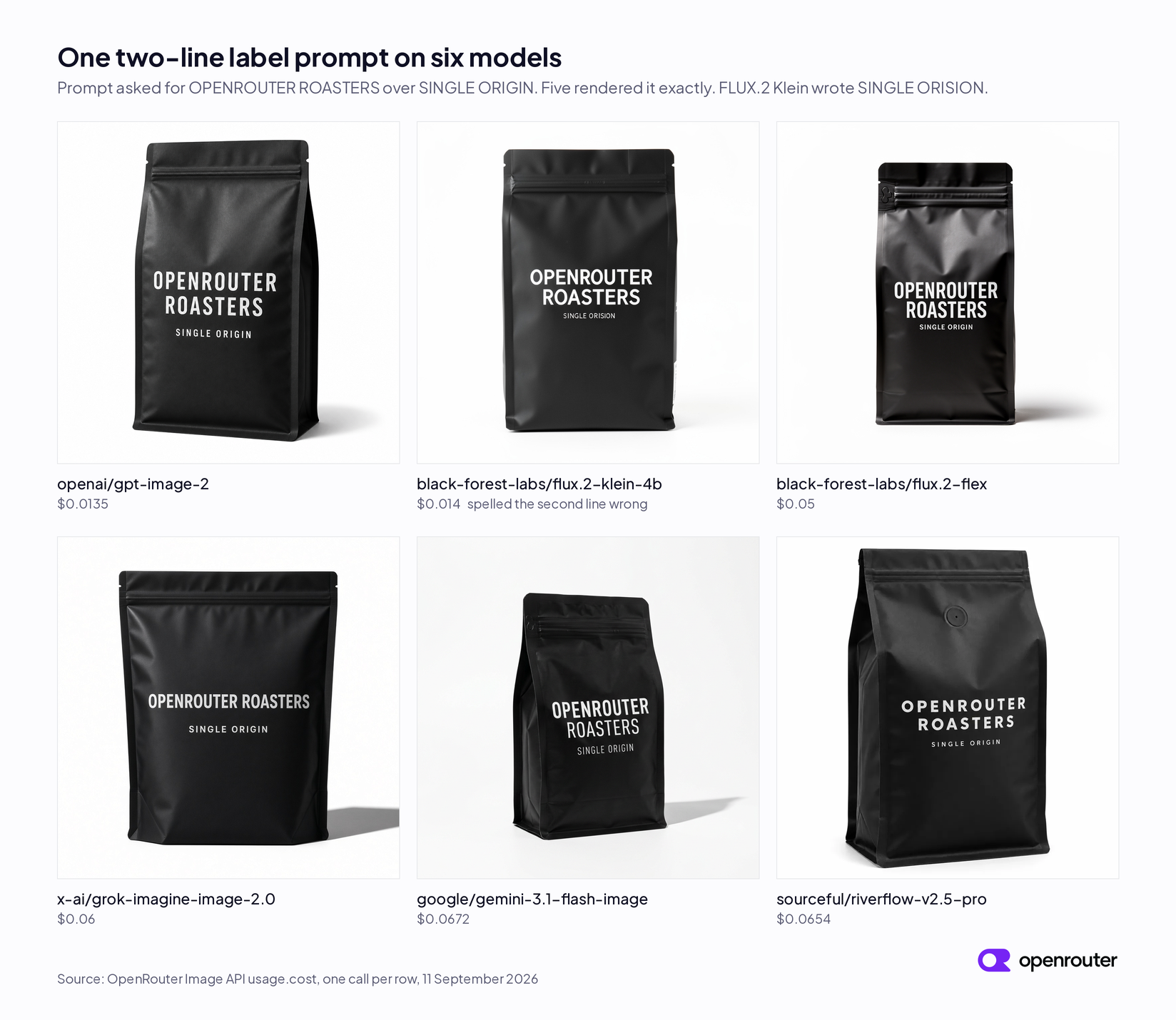
Figure 2. The same prompt through six models, with the measured cost of each call.
Five of the six printed both lines correctly. The exception is black-forest-labs/flux.2-klein-4b, which rendered the brand name correctly and misspelled the second line as SINGLE ORISION.
The most useful comparison is the cheapest model against the most expensive one on the Design Arena board. openai/gpt-image-2 billed $0.0135 and sourceful/riverflow-v2.5-pro billed $0.0654, and both produced a correct, usable packshot. Spending about five times more gave us a different look, not better text.
That does not make Riverflow overpriced. It leads the Design Arena boards, and on a harder image, an unusual composition, or a longer string of text, the gap may show. What it does mean is that neither the leaderboard nor the price column predicted the result on this prompt, and only running the prompt did.
Two smaller things came out of the same test. Your prompt length changes your bill on the per-token models, since openai/gpt-image-2 billed $0.006 on the one-line prompt earlier and $0.0135 on this longer one. And every model read “studio packshot” differently, from a hard-shadow product shot to a soft-lit one, so composition is a style choice to test.
Pick by job
Pick the model on whichever constraint is tightest for you. That may be cost at volume, whether the image has to contain readable words, how many reference images you need to send, or whether the reply needs text alongside the picture.
High volume, ordinary prompts
Start with openai/gpt-image-2. It billed $0.006 on the short prompt in the cost table and $0.0135 on the longer coffee-bag prompt, because it is priced per token and your prompt is part of the bill. Budget in that range for product prompts of similar length. It is the cheapest model we measured and it rendered our text correctly for the least money.
black-forest-labs/flux.2-klein-4b at $0.014 is the other cheap option, with one measured catch. It was the only model of the six that misspelled the label, and it had the lowest Design Arena rating of the models on both boards. Use it for volume work with no readable words in the frame. Do not use it when a product name has to come out right.
The OpenAI figures assume you leave quality unset. Moving it to high multiplied that line of our bill by 35. Klein has no quality setting, so its cost is easier to forecast and there is no setting to raise when you need a better result.
On the coffee-bag prompt the two came out at $0.0135 and $0.014, which is $135 against $140 for ten thousand images. At that point price is not deciding anything, so run your own prompts through both and let the output decide.
One operational note about Klein. Black Forest Labs publishes its weights on Hugging Face, where the repository is named black-forest-labs/FLUX.2-klein-4B rather than using our slug’s capitalization. You can call it through us now and move it in-house later without changing the model family you built around.
Words inside the picture
Packaging, UI mockups, slides, and posters fail when the model garbles a product name.
Five of the six models we tested handled a two-line label with no help, so pick on cost and style, then check the result against your own words rather than ours.
black-forest-labs/flux.2-flex rendered our label correctly, billed $0.05 for the image, and takes up to eight reference images. If you are already on FLUX.2 and the words matter, it is the FLUX.2 model to move to. If you are not committed to a family, openai/gpt-image-2 did the same job for about a quarter of the price.
Before you settle, look at recraft/recraft-v4.1-vector, which solves the problem differently. It returns SVG rather than pixels, and its endpoint accepts style, controls, and text_layout as passthrough parameters under provider.options. For a logo or a label that has to scale and stay editable, vector output beats a sharper raster, and $0.08 an image gets you a file you can open in a design tool.
Reference-consistent brand work
Here, the same object has to look the same everywhere it appears. A bottle on the product page and the same bottle in a campaign image should not drift apart.
We tested this. We took the coffee bag openai/gpt-image-2 had already made, sent it back as an input_references image, and asked four models to keep the bag and its printed label exactly as they were while replacing the white background with a dark walnut counter under warm side light.
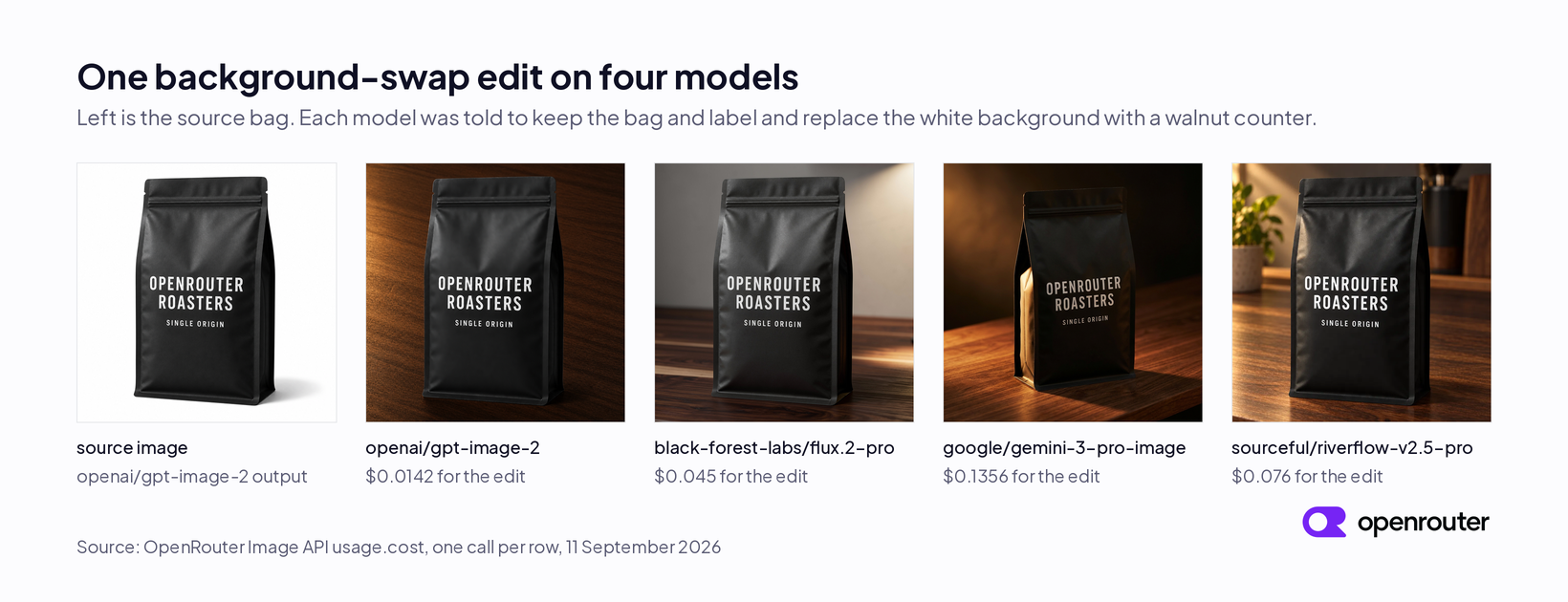
Figure 3. One source image, one instruction, four models, with the measured cost of each edit.
All four kept the wording and the typeface. All four also changed the bag’s shape, proportions, or lighting to some degree, and none reproduced the source bag pixel for pixel, so if every image in a campaign has to match one hero shot, compare the outputs against the source rather than reading the label alone.
To compare editing against generating fairly, we also ran the generate side using the edit instruction as the prompt, so both columns come from the same wording. That matters because two of these models bill per token, where a longer prompt is a bigger bill on its own.
| Model | Generate | Edit |
|---|---|---|
| openai/gpt-image-2 | $0.0133 | $0.0142 |
| black-forest-labs/flux.2-pro | $0.0300 | $0.0450 |
| google/gemini-3-pro-image | $0.1345 | $0.1356 |
| sourceful/riverflow-v2.5-pro | $0.0646 | $0.0760 |
black-forest-labs/flux.2-pro billed half as much again for the edit. Its edit response reported 4,096 prompt tokens where the generate response reported 34, which is the reference image being counted as input, and its endpoint lists a rate for output megapixels only, so the listed rate alone does not predict the edit price. sourceful/riverflow-v2.5-pro billed 18 percent more for the edit. On openai/gpt-image-2 and google/gemini-3-pro-image the gap was under 7 percent. These are single runs, so read the small gaps as approximate rather than as precise premiums.
Two numbers narrow the field for editing, namely how many reference images the model accepts and how it rates on the Design Arena image editing board.
black-forest-labs/flux.2-pro takes eight references and billed $0.03 to generate and $0.045 to edit. black-forest-labs/flux.2-max gives you the same eight references at $0.07 per generated image.
If your brand kit runs past eight images, FLUX.2 cannot take it. The Gemini 3.x image models and Seedream 5.0 take fourteen, and the OpenAI image models take sixteen. Grok caps at three.
A reply with both a picture and text
Sometimes the user is in a conversation and the answer should include an image and a written explanation. Nine of the image models on our catalog list text among their output modalities, and they are the ones that can do this. They are the Gemini image models and OpenAI’s gpt-5-image models.
Being able to return text and doing it are different things. We took four of the nine, sent each the same request through the chat completions endpoint with modalities: ["image", "text"], asked for an image plus a two-sentence explanation, and counted how often we got both. These costs are higher than the same models’ figures in the cost table because the reply carries text, and on a per-token model you pay for both.
| Model | Replies with text | Cost per call |
|---|---|---|
| openai/gpt-5-image | 2 of 3 | $0.20 to $0.28 |
| google/gemini-3-pro-image | 3 of 3 | $0.138 to $0.140 |
| google/gemini-3.1-flash-image | 1 of 4 | $0.067 |
| google/gemini-3.1-flash-lite-image | 0 of 2 | $0.034 |
Every one of those calls returned at least one image. google/gemini-3-pro-image returned two images per call. The difference is the written half, and the two cheaper Gemini models mostly skipped it even though the prompt asked for it directly.
If the text is optional, google/gemini-3.1-flash-image at $0.067 works and you handle the empty case. If your product breaks without the text, google/gemini-3-pro-image at about $0.139 was the only model of the four that answered with text every time in our run.
We recommend the dedicated Image API over chat completions for new image work, because new image models are added only to the Image API and the chat route gives you fewer parameters. openai/gpt-5-image was also the most expensive option here at $0.20 to $0.28 a call, and it returned text in two of three calls. These chat calls bill prompt and completion tokens on top of the image, so a long instruction and a long answer cost more than the per-image figure.
Three jobs, two endpoints
Generating, editing, and chatting look similar, but they are different requests. Generating and editing use the images endpoint and differ by one field. Chatting uses the chat completions endpoint instead, and only the nine text-capable models above can do it. Our Image Generation Models on OpenRouter tutorial covers the full request and response contract for both endpoints.
![Diagram of three request shapes. Generate and edit both go to POST /api/v1/images, and edit adds an input_references array. Chat goes to POST /api/v1/chat/completions. The Image API response carries data[].b64_json, data[].media_type, and usage.cost. The chat response carries message.content and message.images.](/blog/images/image-generation-endpoints.png)
Figure 4. Generating and editing are one endpoint with a different body. Chatting is a different endpoint.
Generating is POST /api/v1/images with a model and a prompt. You get image bytes back.
Editing is the same endpoint with input_references added, because you are changing an image you already have instead of making a new one.
Chatting sends a messages array to POST /api/v1/chat/completions. Text and images go in, and text and images can come back.
Call it on OpenRouter
The images route is POST https://openrouter.ai/api/v1/images. The only required fields are model and prompt.
curl https://openrouter.ai/api/v1/images \
  -H "Authorization: Bearer $OPENROUTER_API_KEY" \
  -H "Content-Type: application/json" \
  -d '{
    "model": "black-forest-labs/flux.2-klein-4b",
    "prompt": "A studio packshot of a glass bottle, hard key light, no text.",
    "aspect_ratio": "1:1"
  }'
The response includes the image and its cost. This is the response we received for that request on 11 September 2026, trimmed to the fields this article discusses and with the image bytes removed.
{
  "data": [
    {
      "b64_json": "<base64>",
      "media_type": "image/jpeg"
    }
  ],
  "usage": {
    "prompt_tokens": 16,
    "completion_tokens": 4096,
    "total_tokens": 4112,
    "cost": 0.014,
    "completion_tokens_details": {
      "image_tokens": 4096
    }
  }
}
To edit an image instead, add an input_references array to the same body. Each entry is an image_url object carrying either an HTTP(S) URL or a base64 data URL.
{
  "model": "black-forest-labs/flux.2-pro",
  "prompt": "Keep the bag and its printed label exactly as they are. Replace the white background with a dark walnut counter under warm side light.",
  "aspect_ratio": "1:1",
  "input_references": [
    {
      "type": "image_url",
      "image_url": {
        "url": "data:image/png;base64,<base64>"
      }
    }
  ]
}
Our TypeScript SDK wraps the same route and camel-cases the field names, so b64_json becomes b64Json, media_type becomes mediaType, and aspect_ratio becomes aspectRatio. The generate method’s return type also covers the streaming case, so narrow on the data property before you read it.
import { OpenRouter } from '@openrouter/sdk';

const openRouter = new OpenRouter({ apiKey: process.env.OPENROUTER_API_KEY ?? '' });

const result = await openRouter.images.generate({
  imageGenerationRequest: {
    model: 'black-forest-labs/flux.2-klein-4b',
    prompt: 'A studio packshot of a glass bottle, hard key light, no text.',
    aspectRatio: '1:1',
  },
});

if (!('data' in result)) {
  throw new Error('Expected a non-streaming image response');
}

const image = result.data[0]?.b64Json;
const mediaType = result.data[0]?.mediaType;
const cost = result.usage?.cost;
FAQ
What is the best image generation model in 2026?
There is no single best model, so pick by job. In our 11 September 2026 run, openai/gpt-image-2 was the cheapest model we measured at $0.006 to $0.0135 per image depending on prompt length, and it rendered a two-line label and a reference edit correctly. sourceful/riverflow-v2.5-pro led the Design Arena image and image editing boards and billed $0.064 per image. recraft/recraft-v4.1-vector returns editable SVG at $0.08 per image.
Which image generation model is cheapest on OpenRouter?
Of the 20 models we measured at 1024x1024 with default settings, openai/gpt-image-2 billed the least at $0.006 for a one-line prompt. black-forest-labs/flux.2-klein-4b billed $0.014, and sourceful/riverflow-v2.5-fast billed $0.0176. On per-token models the prompt length changes the bill, and on OpenAI models the quality setting moved the same image from $0.006 to $0.211.
Which image models can edit an existing image?
Any model whose endpoint lists input_references accepts reference images through POST /api/v1/images. The limit varies by model. On 11 September 2026, OpenAI image models accepted 16, Gemini 3.x image models and Seedream 5.0 accepted 14, sourceful/riverflow-v2.5-pro accepted 10, FLUX.2 Flex, Pro, and Max accepted 8, FLUX.2 Klein and Qwen Image 3 accepted 4, Grok Imagine accepted 3, and Recraft, Krea, and MAI Image accepted 1. Read GET /api/v1/images/models/{model}/endpoints for the current value.
Which image models can reply with both text and an image?
The models whose output modalities include text. On 11 September 2026 that was nine of the 52 image models on our catalog, all Gemini image models and OpenAI gpt-5-image models. Call them through POST /api/v1/chat/completions. In our test, google/gemini-3-pro-image returned text in 3 of 3 calls, openai/gpt-5-image in 2 of 3, google/gemini-3.1-flash-image in 1 of 4, and google/gemini-3.1-flash-lite-image in 0 of 2.
What image format does the Image API return?
It depends on the model. In our run, FLUX.2, Grok, and Seedream returned JPEG, OpenAI, Qwen, Microsoft, and Krea returned PNG, Sourceful and Recraft returned WebP, and recraft/recraft-v4.1-vector returned SVG. More than a dozen catalog models accept an output_format parameter. Read the media_type field on each response rather than assuming a file extension.