How to Choose the Best AI Model (Live, in Your Editor)
OpenRouter · · Updated

To choose an AI model, define the task, shortlist candidates from live usage and benchmark data, compare price and latency across providers, then test the finalists on your own prompts. Judge them on cost per completed task rather than cost per token, and expect the answer to change as new models are released.
We won’t name a single best model. Any name we printed would be out of date within a month, and the right model depends on what you’re building and what you’re willing to pay for correct results.
This article describes the framework we use to answer the question, and how to run it without leaving your editor. Our MCP server connects your assistant to live usage rankings, third-party benchmarks, per-provider pricing, and a way to send test prompts to candidate models.
Tl;dr
- Best means your task, your cost per completed task, and your latency budget. A leaderboard rank isn’t one of the three.
- Use benchmarks to build the shortlist and your own prompts to pick the winner. Ori Eval can write and run that comparison for you.
- Query live rankings and prices from your editor over MCP, then measure what each test call costs with
get-generation. - If no model wins clearly, route per request with
openrouter/auto-betainstead of picking one.
Why there is no single best AI model
There’s no single best AI model, only the best model for a given task, budget, and moment.
Different tasks require different strengths. Summarization and coding place different demands on a model. Extraction needs valid JSON on every call more than it needs good prose. A chat feature depends on how quickly the first token arrives, which is separate from the quality of the full answer. A model that ranks first on a coding benchmark can still perform poorly on long documents and cost too much for routine extraction.
A more useful question includes the specific job. Instead of “what is the best AI model,” ask “what is the best model for extracting line items from scanned invoices,” or “for reviewing a TypeScript pull request,” or “for summarizing a 90-minute call transcript.” Write your own version of that question, then answer it from current data rather than from an old ranking.
Our traffic shows how much the answer varies by task. We classify a sample of requests into 29 task types and publish the market share. Coding alone accounts for nine of them, covering code generation, debugging, code review, repo scanning, SQL work, and DevOps config. Those nine don’t share one leader. In the seven-day window ending 25 July 2026, one model led eight of them and a different one led code review and security. “Best model for coding” is too broad a question even within coding.
Benchmarks are a filter, not an answer
Benchmarks are useful for narrowing hundreds of options down to a few candidates you can test properly. We surface third-party scores from Artificial Analysis and Design Arena alongside our own usage data.
A leaderboard can’t make the final choice for you. Scores are noisy, popular benchmarks attract tuning, and none of them ran your prompts. Use the leaderboard to shortlist and your own tests to decide.
Different tasks require different strengths. Coding needs reasoning quality and reliable tool calls. Summarization needs a large context window and low input pricing. Extraction needs consistent adherence to a schema more than fluency. Chat needs low latency. Vision needs a model that accepts images at all, which narrows the field before quality matters.
No model leads every category. Choosing one model for everything produces an expensive default that performs well in demonstrations and poorly on the work you actually run.
Set up the OpenRouter MCP server
Every step below runs through the MCP server, so connect it first.
The OpenRouter MCP server is hosted by us, so there’s nothing to install locally. Any MCP client can connect. The setup below covers Claude Code, Cursor, and the Codex CLI, and the docs also cover OpenCode and Claude Desktop. You connect once, and your assistant can then pull live models, pricing, credits, rankings, benchmarks, and docs, and send test prompts, without you leaving the editor. Use it while you’re choosing a model. When you ship, call the API as normal.
Claude Code:
claude mcp add --transport http openrouter https://mcp.openrouter.ai/mcp
claude mcp login openrouter
You can also authenticate from inside a session by running /mcp, selecting openrouter, and clicking Authenticate.
Cursor: add this to ~/.cursor/mcp.json, then verify with cursor-agent mcp list.
{
  "mcpServers": {
    "openrouter": { "url": "https://mcp.openrouter.ai/mcp" }
  }
}
Codex CLI:
codex mcp add openrouter --url https://mcp.openrouter.ai/mcp
codex mcp login openrouter
Authentication is one browser step and works the same way in all three editors. In Cursor it runs on your first request rather than from a login command. An unauthenticated request returns a 401 that starts our OAuth flow, and the approval screen states what you’re agreeing to before you agree to it.
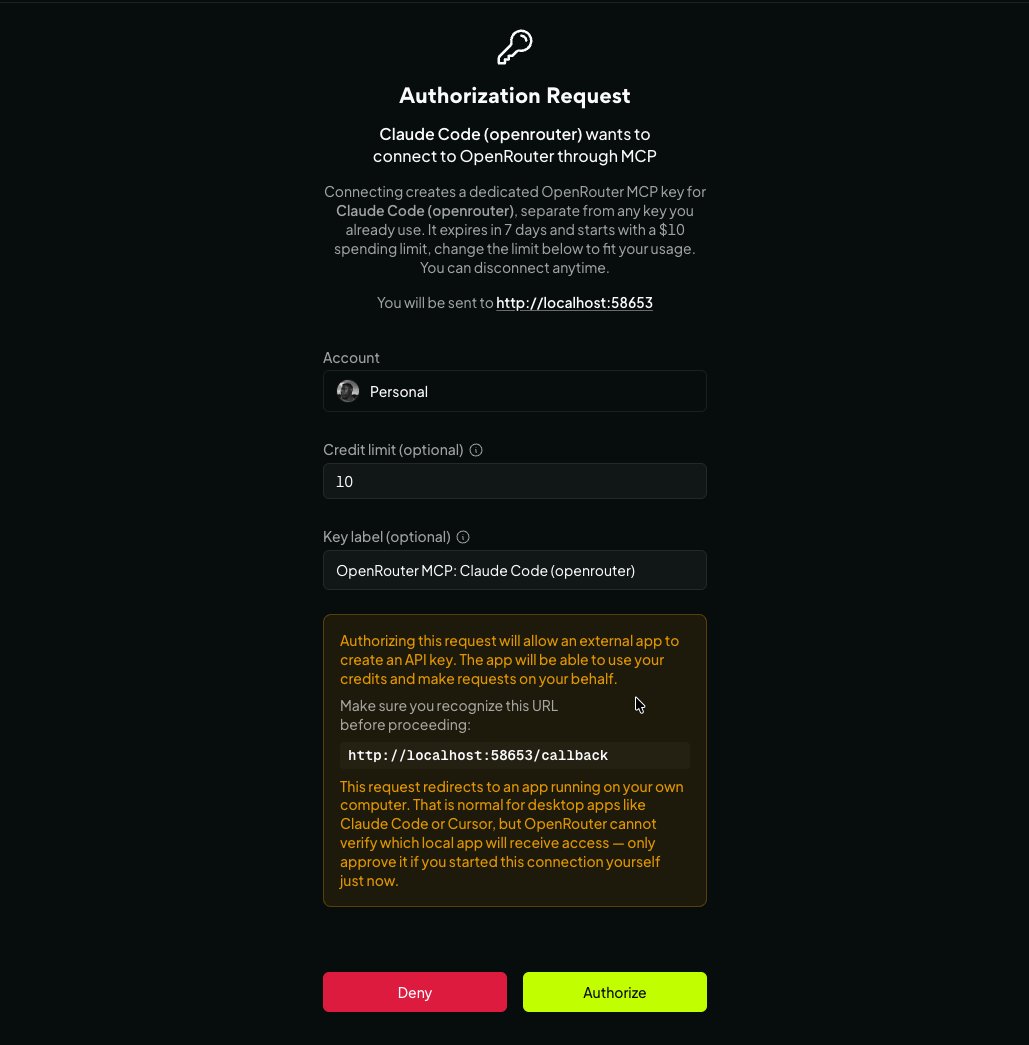
We mint a key labelled OpenRouter MCP: <app name>, scoped to that client, with a seven-day expiry and a $10 credit limit you can change on that screen (MCP announcement). The key is short-lived and capped by default, you can disconnect at any time, and it’s revocable from your keys dashboard.
The flow redirects to localhost, which is normal for a desktop client like Claude Code or Cursor, but it means we can’t verify which local app receives the key. Approve it only if you started the connection yourself a moment ago.
The tools you’ll use
Most are read-only lookups against live data. The exceptions are send-message, generate-image, transcribe-audio, and generate-speech, which make billable inference calls, and send-feedback, which writes feedback on one of your own generations (MCP docs).
| Tool | What it returns |
|---|---|
list-task-classifications | Traffic share by task type, with the leading models for each |
list-benchmarks | Third-party scores from Artificial Analysis and Design Arena, filterable by task type |
list-daily-model-rankings | Daily token totals for the top 50 models, for trend rather than task fit |
list-models / get-model | Search the live catalog; full detail on one model |
list-model-endpoints | Every provider serving a model, with price, latency, throughput, and data policy |
search-docs | Answers pulled from our current docs, in-tool |
send-message (billable) | Run a candidate on your prompt. Supports :online, :nitro, :floor, :free |
get-generation | Exact cost, token counts, provider, and latency for one call |
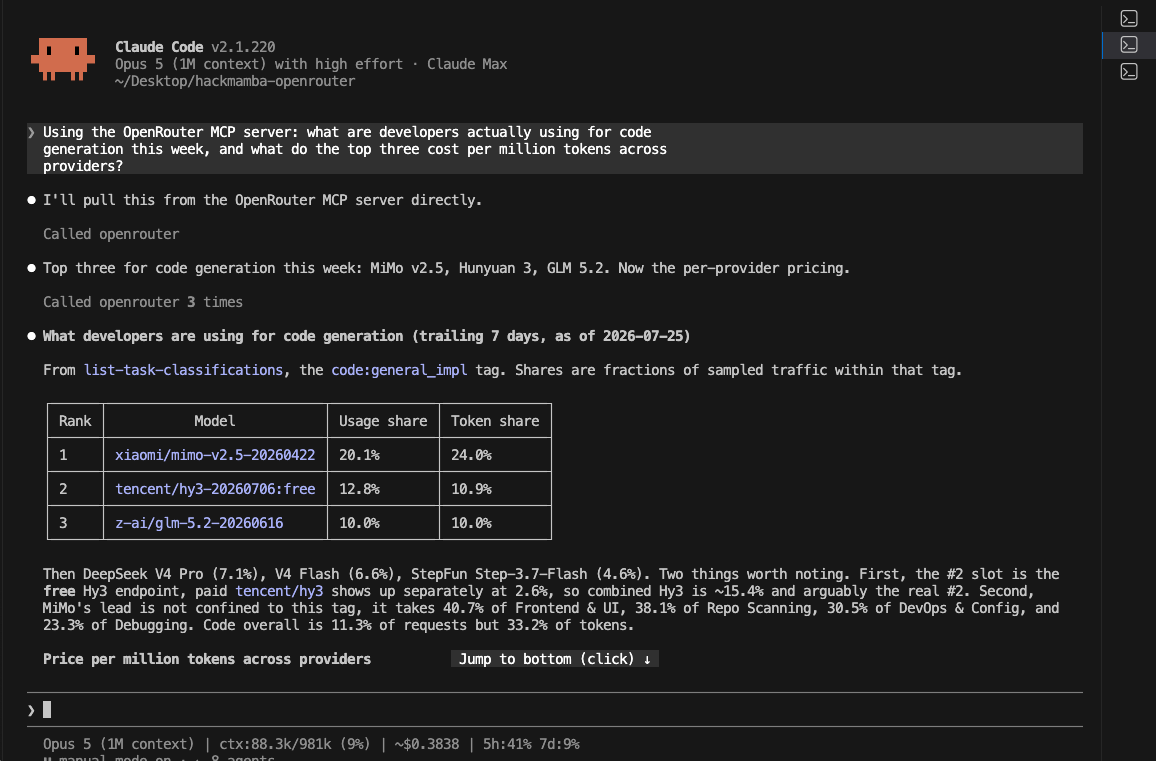
The assistant calls list-task-classifications for the code:general_impl tag and returns the leading models with their usage and token shares, then continues to per-provider pricing. No browser is involved.
A six-step framework for choosing a model
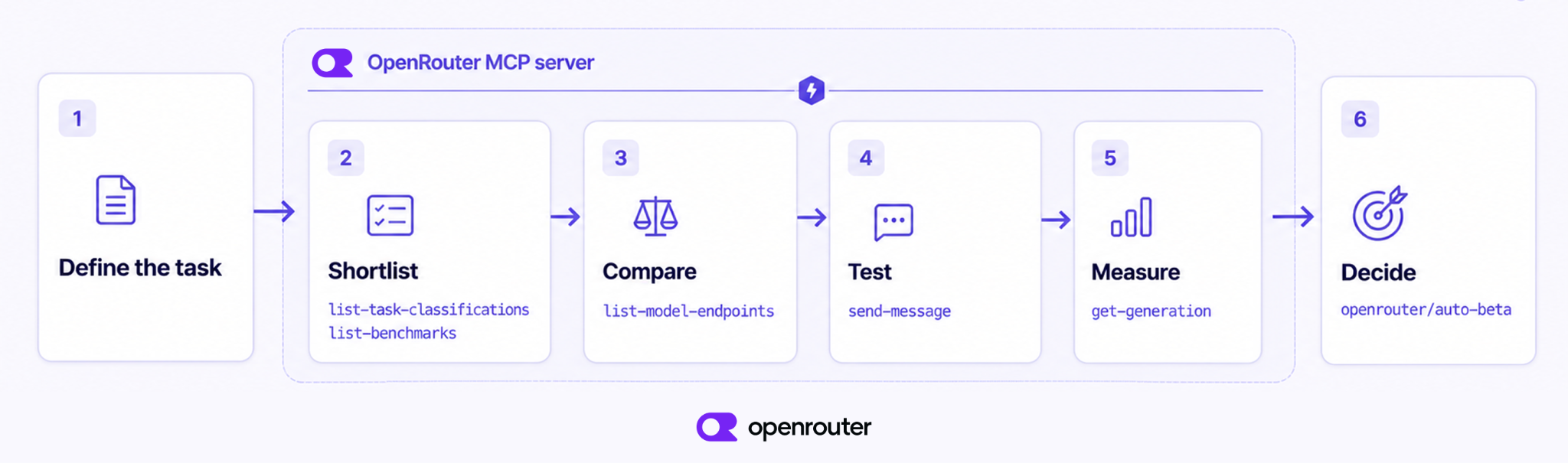
Run these in order. Steps 2 through 5 each map to a specific call your assistant can make against live data. Steps 1 and 6 are your judgment: you define what you need and then decide what to ship.
Step 1. Define the task as you will ship it
Start with the job, not a model name. Write down the input, the output you expect, what counts as good, your latency target, and which way you lean when cost and quality conflict.
The last item affects every later step. A summary shown to customers justifies a higher price. A nightly extraction job across a million records justifies a lower price, even at some cost in quality, because volume dominates the bill. State which of those you’re building.
Step 2. Shortlist from live data
The shortlist comes from two questions: what are people using for this job, and what scores well on it?
For the first, call list-task-classifications. It returns our 29 task tags over a trailing seven-day window, each with its usage share and a ranked list of the models serving it, drawn from real traffic. For the second, call list-benchmarks with task_type set to coding, intelligence, or agentic, which returns Artificial Analysis and Design Arena scores alongside pricing. Those three categories are deliberately coarser than the 29 traffic tags, and the two calls are meant to be used together. The benchmark filter removes low-scoring models across a broad category, and the traffic tag then shows which models people use for your specific part of it.
list-daily-model-rankings is useful for trends. By default it returns daily token totals for the top 50 models overall, plus one aggregated other row per day. You can narrow it by use-case category such as programming or roleplay, by modality, or by tool-calling activity, but the category slices come from a sampled dataset aggregated weekly, so treat those totals as estimates. It tells you what’s growing, not what performs well on your job. The same view is available at openrouter.ai/rankings.
Step 3. Compare cost, providers, and latency
For each finalist, call list-model-endpoints. You get every provider serving that model with its price, context length, throughput and latency over the last thirty minutes, uptime, quantization, and supported parameters. The same model can differ between providers in price, speed, and reliability, and it’s better to find those differences here than in production.
The compare page shows the same data in a browser when you need to share it with someone.
Step 4. Test the shortlist on your own data
Benchmarks gave you the shortlist, and your own prompts make the final choice.
Run send-message against work you actually have: real tickets, real documents, real schemas, including the ones that usually cause failures. A clean evaluation set makes every model look competent, which is why it can’t separate them.
Three variants help while testing. :floor routes to the cheapest provider serving that model, which keeps evaluation costs down. :nitro routes to the fastest, which is how you check a latency budget. :online adds web search when the task needs current context.
Watch what :online costs. Running the same trivial prompt three ways, :floor came to $0.0000030 and :nitro to $0.0000024, while :online came to $0.0052576. That’s roughly two thousand times the plain call for a single prompt, so use it deliberately rather than leaving it enabled.
Make the comparison repeatable with Ori Eval
Ad-hoc test calls answer the question once. Ori Eval makes this step repeatable. You ask a question in plain words, for example “what is the best model for my support agent,” and your coding agent finds test material in your project, writes the eval as a *.eval.ts file, runs the candidate models, and recommends one with the scores, times, and costs behind it. To start it from your editor, give your coding agent this instruction:
run curl -fsSL https://openrouter.ai/skills/spawn-ori-eval and follow the instructions in its output to get startedOri resolves one harness and one model for a run and holds them for every test in that run, so two runs of the same eval files use the same configuration. It sends its requests through OpenRouter, so one comparison can include models from many providers. The instruction above works in a temporary directory. If you run the manual steps instead, the eval files stay in your project as normal code, and you can re-run them when a new model is released, compare against an earlier run with --baseline, and run them in CI on a schedule.
Step 5. Measure cost per completed task
After each test call, pass the generation ID to get-generation. You get the exact cost, the prompt and completion token counts, the provider that served it, and the latency. Average across a set of representative prompts, adjust for how often the task succeeds, and record that number in the decision doc.
Two things to note. The generation record isn’t queryable the instant the call returns, so a lookup made immediately afterward returns a 404 and resolves a few seconds later. Retry rather than treating that first 404 as a failure. Also, the completion response already carries usage.cost, so if the price of the call is all you need, skip the extra round trip. Use get-generation when you want the provider, the latency, or the native token counts as well.
Step 6. Decide, or route per request
If one model wins clearly across the work you run, use it.
If the results are close, if your traffic mixes several kinds of jobs, or if you don’t want to revisit the decision every time a better model is released, point at the Auto Router with the model string openrouter/auto-beta. The older openrouter/auto still resolves but is documented as deprecated, so use the current one.
The router doesn’t pick at random. It classifies each request into roughly 30 fine-grained task types, ranks candidates by real-world spend share over a trailing seven-day window, applies your cost and quality preference, and routes with fallbacks (Auto Router docs). That’s the framework above, running per request, on the same task-classification data you queried in Step 2.
Think in cost per task, not cost per token
Cost per task, not cost per token, is the correct unit for comparing model economics.
People compare on per-token price because it’s easy to compare, and because fully-loaded cost used to be difficult to measure. With get-generation returning the real number on every call, that difficulty is gone.
A model with a low unit price stops being cheap when it retries, produces completions longer than your token budget, or needs a stronger model behind it to catch its failures. A more expensive model that completes the task on the first attempt often costs less in total.
A 2026 study of reasoning-model pricing measured this. In 32% of model-pair comparisons the model with the lower listed price incurred the higher total cost, with the reversal reaching 28x at the extreme (Chen et al., “The Price Reversal Phenomenon”). The authors attribute it to how differently models spend tokens on thinking: on the same query one model can use 900% more than another, and repeated runs of a single query vary by as much as 9.7x. Listed price reflects none of that.
cost per task = ((input tokens × input price) + (output tokens × output price)) × expected attemptsMost comparisons leave out expected attempts, and that term usually decides the result.
Here is the calculation with real prices, checked on 27 July 2026. GPT-5.4 mini listed at $0.75 per million input tokens and $4.50 per million output. Claude Sonnet 5 listed at $2.00 and $10.00, roughly 2.4 times more. Take a task of 2,000 input and 800 output tokens. If Sonnet 5 succeeds on the first attempt 95% of the time, it costs about $12.63 per thousand completed tasks. For the mini to match that, it has to succeed on the first attempt 40% of the time. Below 40%, the model that is 2.4 times cheaper per token is the more expensive way to finish the work.
When you report this to others, use cost per 1,000 completed tasks. The model with the cheapest tokens is often not the cheapest way to finish the work.
The chart below plots the whole curve instead of the single point. The curve is the more useful thing to keep, because the break-even rate moves with the price gap between the two candidates you’re comparing. A wider gap lets the cheaper model tolerate a much lower success rate before it loses.
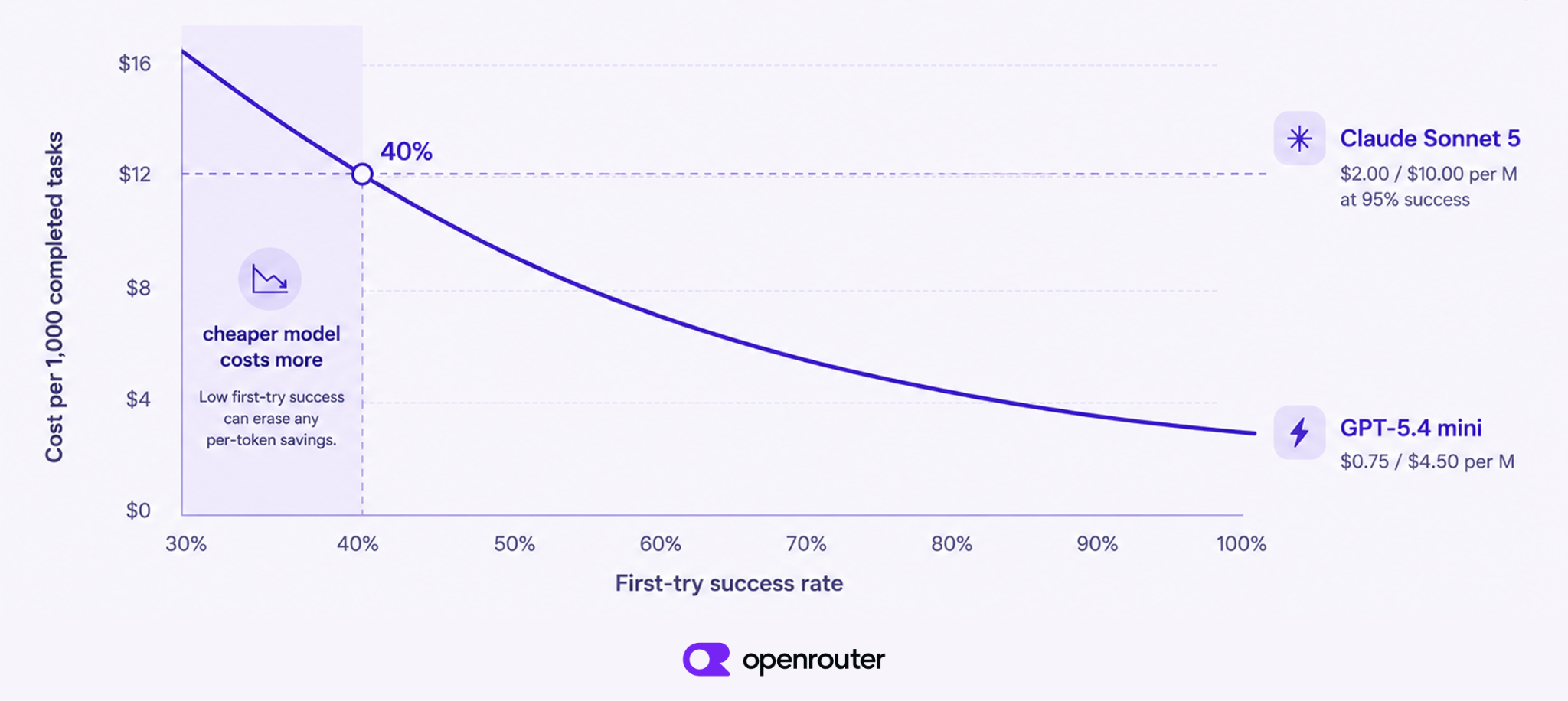
The same worked example, plotted across every success rate rather than one. Sonnet 5 is held flat at 95% for reference while the mini’s rate varies. List prices are as of 27 July 2026, the task is 2,000 input and 800 output tokens, and the success rate is the variable being swept rather than anything we measured.
What to optimize for, task by task
This is a starting point rather than a ranking. Each row tells you what to optimize for and which call to make, and the live data supplies the name. We don’t print winners, because any list of winners would be out of date by the next release.
| Task | Optimize for | How to shortlist |
|---|---|---|
| Coding | Reasoning quality, tool-call reliability, then latency | list-benchmarks with task_type=coding, cross-checked against the code: tags in list-task-classifications |
| Summarization and long context | Context window and input price, which dominate the bill | list-model-endpoints for context length and prompt pricing |
| Structured extraction | Schema adherence and valid JSON on every call | list-model-endpoints for supported parameters, then send-message against your real schema |
| Chat and assistants | Latency first, then quality | list-model-endpoints for provider latency and throughput; test with :nitro |
| Vision and multimodal | Image input support, then domain fit | list-models filtered by input modality, then your own images |
| Agentic tool use | Instruction following across many steps | list-benchmarks with task_type=agentic, then multi-step tests |
Coding: Decide which kind of coding you mean. Our task tags separate code generation from debugging, review, frontend, and repo scanning, and the leaders differ. Test candidates on a real ticket from your backlog, not on a toy problem.
Summarization: Read input price and context length together, because either one alone will mislead you. A cheaper model with a large window often beats a stronger one with high input pricing.
Extraction: A smaller model that returns valid JSON every time beats a stronger one that corrupts a field twice a day. Test the difficult inputs: missing fields, ambiguous records, and malformed source text.
Vision: Multimodal quality varies strongly by domain, so filter for image input and then run your own screenshots. A stock demo set makes every candidate look good.
In every case, run the query, look at this week’s numbers, and pick from those.
Why run the loop through OpenRouter
You don’t have to commit to one model at all.
One integration gets you the whole catalog across providers. When a better model is released next month, you change a model string instead of integrating another SDK and re-testing an integration path. Selection and execution sit on the same platform, and with MCP the selection data is available in the editor you already work in. You also get provider redundancy and automatic fallback, and a per-request cost figure precise enough to make the cost-per-task calculation above accurate rather than estimated.
Going direct to a provider is a reasonable choice if you’re certain you want exactly one model from exactly one place and that won’t change. New models are released constantly, so consider how certain you are.
Common mistakes when choosing a model
Most bad model decisions come from measuring the wrong thing, or measuring the right thing too late. These are the five we see most.
Treating leaderboard position as a production decision: A high rank on a public leaderboard earns a place on your shortlist, not production traffic. Run your prompts through the model first.
Shopping by price per token: A low unit price hides retries, long completions, and fallbacks. Until get-generation has told you the cost per completed task, you don’t know what the model costs.
Ignoring context shape: Check both the context length and what you pay at that length. Long-context models are capable and expensive. Use the smallest reliable context strategy that does the job, and consider retrieval before you consider a bigger window.
Picking once and not revisiting: The best model for your task in January won’t be the best in July. We added around 40 models in the thirty days to 27 July 2026, so re-run these six steps after any major release in your category, keep an Ori eval in your repo and re-run it on a schedule, or hand the problem to the Auto Router.
Leaving latency and reliability until go-live: Check the latency, throughput, and uptime figures in list-model-endpoints, then exercise the endpoint the way production will. Finding an unreliable provider after launch is an avoidable incident.
Choose for the task, then keep the choice current
The right question isn’t which model is best, but which model is best for what you’re building, at your budget, right now.
With a clear task definition, live data, and a set of real prompts, you can answer that in an afternoon, and re-answer it in minutes when something changes.
- Best is task-specific and time-specific. Judge on cost per completed task and latency, not on rank.
- Benchmarks build the shortlist, and your own data picks the winner.
send-messageandget-generationsettle it. - The whole loop runs from your editor once the MCP server is connected.
Add the OpenRouter MCP server and ask your assistant to shortlist and price candidates for the job you’re shipping this week. If you’re undecided, or running a mix of tasks, use the Auto Router with openrouter/auto-beta and let it pick per request.
Frequently asked questions
How do I choose the best AI model?
Define the task precisely, shortlist candidates from live usage and benchmark data, compare price and latency across the providers serving each model, then test the finalists on your own prompts. Judge the winner on cost per completed task rather than cost per token. On OpenRouter you can run every one of those steps from your editor through the MCP server.
What is the best AI model for coding?
There’s no fixed answer, and coding isn’t one task. We classify coding traffic into nine separate tags covering code generation, debugging, file I/O, shell execution, code review and security, frontend and UI, repo scanning, SQL and database work, and DevOps config, and the leading model isn’t the same across them. Shortlist with list-benchmarks using task_type=coding, cross-check against real traffic with list-task-classifications, then test candidates on a real ticket from your own backlog.
What is the OpenRouter MCP server?
It’s a remote MCP server hosted by us, with nothing to install locally. Once connected, your AI assistant can query live model data, per-provider pricing, usage rankings, third-party benchmarks, and documentation, and send test messages to candidate models, all without leaving your editor. Any MCP client can connect. We document setup for Claude Code, the Codex CLI, OpenCode, the Cursor CLI, and Claude Desktop.
How do I set up the OpenRouter MCP server in Claude Code or Cursor?
In Claude Code, run claude mcp add --transport http openrouter https://mcp.openrouter.ai/mcp followed by claude mcp login openrouter. In Cursor, add the server URL to ~/.cursor/mcp.json and verify with cursor-agent mcp list. Authentication is a single browser step, after which we mint a dedicated API key with a seven-day expiry and a $10 spend cap.
What is the difference between cost per token and cost per task?
Cost per token is the advertised unit price for input and output. Cost per task is what it costs to get one successful result, which includes retries, longer completions, and any fallback to a stronger model. A model with a lower token price can cost more per completed task. get-generation returns the actual cost and token counts for each call so you can measure it rather than estimate it.
How do I compare AI models?
Compare them on three axes at once: quality on your task, cost per completed task, and latency. Use third-party benchmarks to build a shortlist, list-model-endpoints to compare price, latency, and throughput across the providers serving each model, and your own prompts to make the final choice. The web view for side-by-side comparison is at openrouter.ai/compare.
How often should I re-evaluate my model choice?
Re-run the framework after any major release in your task category, or whenever cost, latency, or failure rates drift. We added around 40 models in the thirty days to 27 July 2026, so treat model selection as an operational decision rather than a one-time setup step. If you don’t want to track that cadence, route per request with the Auto Router instead.
How do I make model evaluation repeatable?
Use Ori Eval. You ask a question in plain words, and your coding agent finds test material in your project, writes the eval as a *.eval.ts file, runs the candidate models through OpenRouter, and recommends one with the scores, times, and costs behind it. The eval files are normal code, so you can re-run them when a new model is released, compare runs with --baseline, and run them in CI on a schedule.
Should I use one model or route between several?
Use one model when the task is narrow, the prompt is stable, and one candidate clears your evaluation with margin. Route when requests vary in complexity, when reliability matters more than consistency of model, or when you don’t want to revisit the decision every release cycle. The Auto Router classifies each request into roughly 30 task types and picks per request using the community’s share of spend over a trailing seven-day window.
References
Every claim on this page was verified against these sources, including live API calls.
- OpenRouter MCP server docs. The hosted server, per-editor setup, the full tool list, and which tools are billable.
- OpenRouter MCP server announcement. The OAuth flow, the seven-day key expiry and $10 spend cap, and the model suffix variants.
- Models docs. Model metadata fields, including pricing, context length, modality, and supported parameters.
- Model variants docs. The
:online,:nitro, and:freesuffixes and what each one changes about routing. The:floorshortcut is documented under provider selection. - Ori Eval docs. The eval file format,
candidateModels,setupJudge,--baseline, and running evals in CI. - Auto Router docs. Per-request classification into roughly 30 task types, ranking by trailing seven-day spend share, and the
openrouter/auto-betamodel string. - Model fallbacks docs. Provider redundancy and automatic fallback behavior.
- API reference. The production API, for once you have chosen, including how to query cost and stats after a request.
- Model catalog. The live catalog of every model we serve and the providers behind each one.
- Rankings. Daily token totals by model, and the task-classification market share.
- Compare. Side-by-side model comparison on benchmarks, price, context, and latency.
- Artificial Analysis and Design Arena. The two third-party benchmark sources surfaced in
list-benchmarks. - Task classification market share. The endpoint behind
list-task-classifications, returning the 29 task tags with usage share and the leading models per tag. - List benchmarks. The endpoint behind
list-benchmarks, filterable bytask_type. - Get request and usage metadata for a generation. Exact cost, token counts, provider, and latency for a single call.
- Chen, Zhang, He, Stoica, Zaharia and Zou, “The Price Reversal Phenomenon: When Cheaper Reasoning Models Cost More”. Independent measurement of listed price against total cost across model pairs. arXiv, March 2026, revised May 2026.